

VST Reviews
Juice By DLO VST Plugin Review: Gospel Sounds Built From Real Sessions
Apr
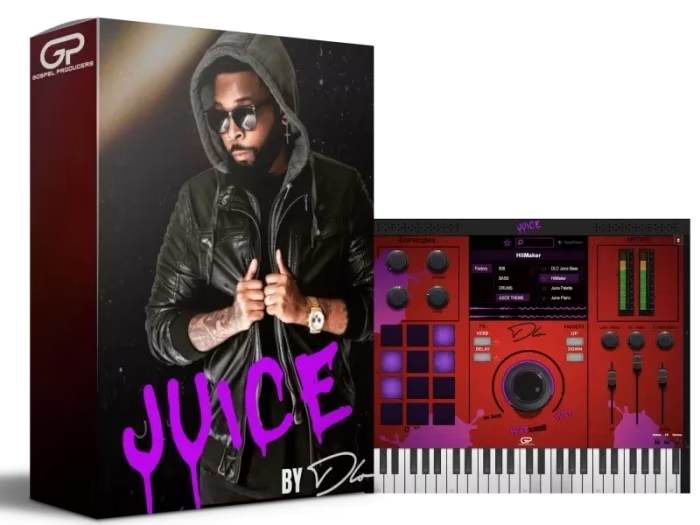
There’s a specific frustration that gospel and R&B producers know well. You spend an hour auditioning piano patches, nothing sounds right, and you’ve barely started the actual track. The sounds are technically fine — they’re just built without any genre context. They could belong in a corporate explainer video as easily as a Sunday morning worship set. Juice By DLO VST was built to solve exactly that problem. Every patch inside comes directly from the real production workflow of David “DLO” Outing, and that origin story changes what the plugin actually delivers. See the complete feature list and current pricing as detailed on the Juice By DLO VST Plugin product page.
🎹 Quick Reference: What’s Inside the Package
- 100+ production-ready presets — pianos, synths, pads, and leads from DLO’s actual sessions
- Dedicated Drum Page — percussive sounds separated from melodic instruments for a cleaner workflow
- 100+ BeatStarter MIDI files — progressions and patterns matched to the preset library
- Dual built-in Multi-FX Processors — delay, reverb, EQ, compression, and saturation without external routing
- 24-bit / 48kHz resolution, one-time license — broadcast-grade quality with no subscription attached
Why the Source of the Sounds Matters
Most producer-branded plugins follow the same playbook. A label licenses a generic sound library, adds a famous name to the splash screen, and ships it. The presets are fine in isolation. They just weren’t built with any particular genre in mind, so they don’t behave the way you need them to when you drop them into a real arrangement.
Juice By DLO isn’t built that way. These patches came from the actual sessions where DLO was building tracks — the specific piano voicing that sat right in the mix, the pad that filled the harmonic space without cluttering the low-mid, the synth lead that cut through without needing a separate EQ pass. That context is baked into how every sound was made, and it shows the moment you start playing.
The dual multi-FX processors built directly into the plugin add another layer of practicality. Delay, reverb, EQ, compression, and saturation are all accessible without leaving the instrument. You’re not routing every patch through an external chain just to hear what it sounds like in context. For producers running dense sessions with CPU headroom in mind, that built-in processing matters.
What’s Included: Full Package Breakdown
Here’s exactly what the license covers and why each piece earns its place in a real production environment:
Pianos, synths, pads, and leads sourced from DLO’s actual session workflow. Every patch is production-ready — you drop it into an arrangement and it sits without separate tweaking.
DLO’s percussive sounds live in their own section, separate from the melodic library. No more scrolling through pads to find a kick. Rhythmic and melodic elements stay organized from the first bar.
Chord progressions and patterns that pair directly with the preset library. Load a MIDI file, assign a patch, and you have a working musical idea in under two minutes — a reliable cure for blank-page paralysis.
Two internal effects engines handle delay, reverb, EQ, compression, and saturation simultaneously. Shape your sounds completely inside the plugin. Cleaner sessions, fewer open plugins.
Every sample recorded at broadcast-grade quality. The sounds hold up under streaming normalization, live performance output, and heavy mix processing without any audible ceiling.
Runs natively on M1, M2, and M3 Apple Silicon without Rosetta. Full compatibility with Ableton Live, Logic Pro, FL Studio, Cubase, and Studio One on both platforms.
No subscription, no recurring charges, no background licensing checks during sessions. You own it outright.
Who Gets the Most Out of This Plugin
Gospel producers are the obvious starting point, and the plugin rewards them immediately. The harmonic vocabulary inside the preset library — the way the piano voicings sit, the character of the pad sustains, the weight of the synth leads — reflects the genre’s priorities in a way that stock libraries rarely do. If you’ve spent sessions hunting for a patch that sounds like it belongs in that context rather than something lifted from a corporate stock library, this cuts that search entirely.
The library also travels well outside gospel. Contemporary Christian music producers will find the keyboard and pad patches translate cleanly across worship and full-production settings. Neo-soul and hip-hop producers will recognize warmth and personality in the synths that don’t feel genre-locked. The presets carry character without being so specific that they fight you when you take them somewhere unexpected.
The BeatStarter MIDI files make the Juice By DLO VST especially practical for producers who hit the blank-page wall at session start. Load a progression, layer a few patches, and you have something musical to build from in minutes. That momentum shift — from staring at an empty arrangement to actively building — is worth more than it sounds on paper. Finished tracks come from sessions with momentum, not perfect starting conditions.
One honest caveat: Pro Tools is not natively supported. AAX format isn’t included. If Pro Tools is your primary host, you’ll need a VST3 bridge like Blue Cat Audio Patchwork. Every other major DAW on Mac and Windows works without any workaround.
Frequently Asked Questions
Ready to add DLO’s signature sounds to your sessions?
Full version. Instant download. No subscription. Currently $74.99 — 50% off regular price.
