
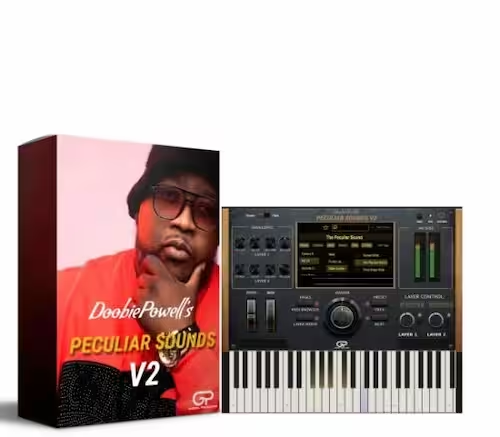
Doobie Powell’s Peculiar Sounds V2 VST Plugin
Doobie Powell’s Peculiar Sounds V2 VST delivers 400+ pro patches—Rhodes, pianos, pads, synths & drums—straight from Doobie Powell’s live rig. VST3, AU & AAX for PC & Mac.
Original price was: $249.99.$119.99Current price is: $119.99.
Description
Peculiar Sounds V2 VST is a professional keyboard instrument plugin built around the actual sounds Doobie Powell uses on stage and in the studio. Rather than pulling from generic sample databases, he sourced every patch from his own performance rig — the same sounds behind gospel recordings and touring sessions spanning two decades. When you load a patch and it sits in your mix without fighting everything else, that’s the difference.
Beyond the patch library, V2 ships with standalone mode, a MIDI browser loaded with chord progressions and drum loops, two new effects, and the Sounds Off The Block expansion at no added cost. As a result, producers who’ve been juggling multiple libraries to cover these sounds will find that one install handles most of it.
What’s Included in Peculiar Sounds V2 VST
PECULIAR SOUNDS V2 — FULL CONTENTS
- ✔ 400+ Professional Patches — Rhodes, pianos, synths, pads, leads, and drums
- ✔ Sounds Off The Block Expansion — Included at no extra cost
- ✔ Standalone Mode — Perform live without opening a DAW
- ✔ Two-Sound Layering — Blend any two patches at once
- ✔ MIDI Browser — Hundreds of chord progressions and drum loops, drag-and-drop ready
- ✔ Lowfizer Effect — Lo-fi degradation with a single knob
- ✔ Mod Filter Effect — Dynamic movement built into the instrument
- ✔ Built-in Arpeggiator — Rhythmic patterns from held chords
- ✔ VST3 / AU / AAX (64-bit) — Windows 10+ and macOS 10.13+, native Apple Silicon
Key Features of Peculiar Sounds V2 VST
Patches, standalone mode, and layering
Doobie Powell VST effects and free expansion
Why Peculiar Sounds V2 VST Stands Out
Built from a real performance rig
Most preset libraries are built to impress on the first listen. Peculiar Sounds V2 VST, however, is built to work on the twentieth. Doobie Powell didn’t sign off on a sound pack — he created these patches from the exact keyboard sounds he performs with at high-profile events and recordings. For that reason, they already sit at the right frequency and dynamic range for gospel, R&B, and contemporary Christian arrangements, so you spend less time tweaking and more time working.
Standalone mode for live performance
The standalone mode is worth singling out for church musicians specifically. Rather than managing a full DAW on a Sunday morning or mid-rehearsal, you simply open the plugin on its own, load your set, and play. There’s no signal chain to untangle if something goes wrong, and consequently no latency spikes when the laptop wakes up mid-service. For that use case, it’s a meaningful practical difference over most keyboard plugins.
Peculiar Sounds V2 vs V1: what actually changed
Compared to the original Peculiar Sounds V1, V2 is a different instrument rather than an expanded version of the same one. The layering system alone changes the production workflow considerably. Additionally, the MIDI browser adds an ideation tool that V1 never had. Producers who want the full breakdown of what changed should read the Peculiar Sounds V2 review before deciding between versions.
Peculiar Sounds V2 VST — Add to Your Studio
400+ pro patches from Doobie Powell’s real rig. Standalone ready. Free expansion included.
Peculiar Sounds V2 Plugin: Workflow Integration
Starting from the MIDI browser
The fastest way to start a session with Peculiar Sounds V2 VST is to open the MIDI browser first. Scan the chord progressions, drop one into your DAW, then scroll through patches until something matches the mood. That process takes a couple of minutes at most, and as a result it bypasses the blank-canvas problem that stalls a lot of producers before they’ve written a single note.
Layering and the built-in effects
Once you have a patch, the layering system opens up further. Two sounds running together means you’re not hunting for a single preset that does everything — instead, you build the texture from parts. This is a more flexible approach than most keyboard plugins offer, and consequently it produces results that sound less like preset browsing and more like actually playing. Gospel Producers, who developed the plugin alongside Doobie Powell, also publish demo videos that show this workflow in practice.
The Lowfizer and Mod Filter further reinforce that approach. Rather than a generic reverb or chorus, both effects target how these sounds actually work in production. The Lowfizer, in particular, does something that’s harder to replicate with standard EQ — it adds harmonic degradation that sounds like it belongs in the recording rather than layered on top of it.
Technical Details
DAW compatibility and performance notes
Mac Pro Tools users get full native AAX support with no additional setup needed. On Windows, however, the VST3 bridge approach is the way to go — Blue Cat Audio Patchwork is the most widely used option and handles routing without audio quality loss. In addition, patch loading is fast on both platforms, and CPU usage stays low even when layering two sounds with effects active. You can also find more background on Doobie Powell’s musical career and discography on his Wikipedia page.
Who This Plugin Is For
Gospel, R&B, and contemporary Christian producers
Gospel and R&B producers get the most direct value here, since the patch library covers those styles specifically — warm, expressive sounds balanced for vocal-led arrangements. That said, contemporary Christian producers and even hip-hop and soul producers regularly find patches in the synth and drum sections that translate well outside the expected genres. In other words, the sounds don’t lock you into a single style.
Church keyboardists and live performers
Church keyboardists, in particular, should pay attention to the standalone mode. Because it removes the DAW entirely from the live performance setup, there are simply fewer things that can go wrong mid-set. For producers who want the full studio picture, the VST Instruments collection has more professional instrument options across styles, and Bundle Deals offers savings when purchasing multiple plugins together.
Frequently Asked Questions
What is the difference between Peculiar Sounds V1 and V2?
V2 is a complete rebuild rather than a patch update. It expands the library from roughly 100 to over 400 patches, adds standalone mode so you can perform without a DAW, introduces two-sound layering, a drag-and-drop MIDI browser with chord progressions and drum loops, two new effects (Lowfizer and Mod Filter), and includes the Sounds Off The Block expansion at no extra cost.
Is Peculiar Sounds V2 worth it for gospel and R&B producers?
Yes, particularly if you work in gospel, R&B, or contemporary Christian music. The patches cover those genres well — warm Rhodes, expressive pianos, and pads that sit well under vocals without crowding the mix. Moreover, the standalone mode and MIDI browser make it a strong choice for producers who need to move quickly from idea to arrangement.
Does Peculiar Sounds V2 work with Logic Pro?
Yes. The plugin installs as an Audio Unit (AU) on Mac, which is the native format for Logic Pro. It also supports VST3 for other Mac DAWs and AAX for Pro Tools on Mac. As a result, Logic Pro users get full compatibility without any workaround or bridge software.
Does Peculiar Sounds V2 support Pro Tools AAX on Mac?
Yes. Mac users get native AAX support covering Pro Tools 12 and above. However, Windows Pro Tools users need a VST3 host bridge such as Blue Cat Audio Patchwork, since the team hasn’t shipped AAX for Windows yet.
Does Peculiar Sounds V2 work on Apple Silicon Macs?
Yes. The plugin runs natively on M1, M2, and M3 Macs in both standalone and DAW-hosted modes. Furthermore, no Rosetta workaround is needed — Gospel Producers built it with native Apple Silicon support from the V2 release.
How many computers can I install it on?
Your license covers 3 active installations. If you need to move the plugin to a new machine, simply deactivate one of the existing installations first through the plugin’s activation manager, then activate on the new computer.
Is activation online or offline?
The first activation requires an internet connection. After that, however, the plugin runs fully offline with no background licensing checks or phone-home requirements. This makes it particularly reliable for live performance setups where internet access isn’t guaranteed.