

VST Reviews
FabFilter Pro-Q 4 Review: The Gold Standard EQ Plugin for Music Producers in 2025
Mar
I’ll be honest: I went into Pro-Q 4 half-expecting to be underwhelmed. Pro-Q 3 had been my default EQ for six years. Not exciting, not glamorous — just the thing I reached for automatically on every channel because it was fast, it sounded transparent, and the visual feedback made decisions easier than any hardware EQ I’d ever used. An update to something that already worked perfectly felt like it had a decent chance of being mostly cosmetic.
It wasn’t cosmetic. Two of the new features genuinely changed how I work. A third one I didn’t expect to care about turned out to be more useful than most plugins I’ve bought in the last two years.
🔬 Spectral Dynamics: The Part That Surprised Me Most
I want to start here because it’s easy to skim past in a feature list and not appreciate what it actually does.
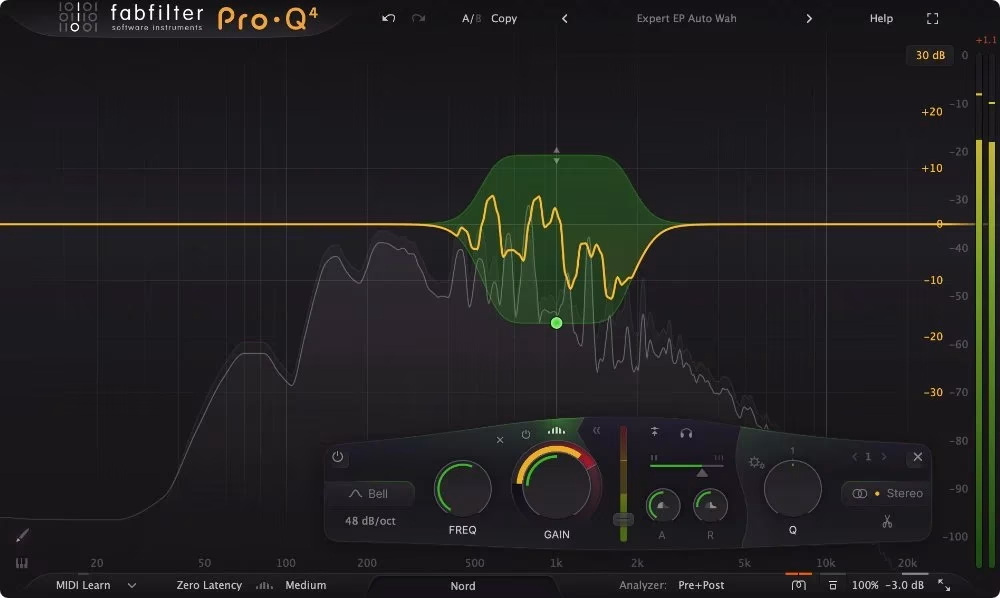
The dynamic EQ that Pro-Q 3 already had worked like this: you set a band, you set a threshold, and when the energy in that frequency region exceeded the threshold, the band would reduce gain. Useful for controlling buildup on a kick drum low-end, managing a vocal that gets harsh in the 2–3kHz range on certain phrases. The limitation is that it treats the entire band as one thing. When the 2.5kHz region on your vocal gets harsh, the dynamic band ducks everything in that region — the problem consonant and the presence and the clarity that was sitting fine right next to it.
Spectral Dynamics uses linear phase processing to look inside the band and identify only the components that are actually crossing the threshold. It targets those and leaves the rest alone. On a vocal recorded in a slightly boxy room, the difference is audible immediately — the resonances get controlled and the natural character of the voice comes through instead of being knocked back with everything else in the region.
I had Soothe2 on most of my vocal chains before this update. I still have it installed, but I’ve been reaching for it less. Spectral Dynamics doesn’t replace it in every situation — Soothe does some things with continuous adaptive processing that Pro-Q 4 can’t match — but for the majority of everyday mixing problems it does the job and saves an insert slot. On a session with 30 vocal tracks, that adds up fast.
📋 The Instance List, or: Why I Don’t Dread Large Sessions Anymore
The old workflow for setting low-cuts across a session with 60 tracks looked like this: open Pro-Q on track 1, set the high-pass, close it. Open Pro-Q on track 2, set the high-pass, close it. Track 3. Track 4. By track 15 you’ve been at it for eight minutes and you haven’t actually mixed anything yet.
The Instance List puts every Pro-Q 4 window in the session into a single scrollable panel. Click the track name at the bottom of any instance and the panel opens. Each track shows a small but readable spectrum analyzer, and you can edit bands directly — drag a high-pass up, add a notch, adjust a shelf — without opening the individual plugin window. There’s a search bar. You can pin the tracks you’re focused on. Resize any instance in the panel for more detail on whichever one needs attention.
The first time I used it on a full session I set low-cuts on 22 tracks in about three minutes. The second time I used it I stopped counting how much time it saved because the answer is obviously a lot and I’d rather just mix.
Post-production people have been particularly loud about this feature. Dialogue editing sessions in Pro Tools with 80+ tracks, all needing consistent low-frequency filtering — the Instance List takes that from half a day of busywork to maybe 15 minutes. I don’t work in post regularly but I understand why they’re excited.
🔥 Character Modes: Small Addition, Real Effect Over a Full Mix
FabFilter added three saturation characters to the bottom-right of the interface — Clean (the old behavior, zero coloring), Subtle, and Warm. My expectation was that Subtle and Warm would be novelty options I’d use once and then leave on Clean forever.
That’s not quite how it played out. On a single track, Subtle mode is almost inaudible — you’d struggle to pick it in a blind test at normal levels. Across 20 or 25 tracks, all running Subtle, there’s a cumulative harmonic density that makes the mix feel less plasticky and more cohesive. Warm is more audible per instance, with a genuine tube-ish rounding on transients that changes the texture of the processed signal in a way that’s immediately noticeable on drums and guitars.
None of this replaces a dedicated hardware emulation EQ if that’s what you’re after. A Neve 1073 plugin has a character that goes well beyond what Warm mode adds. But if you were using Pro-Q for subtractive EQ and then inserting an API emulation behind it purely to add some life to the signal, Subtle or Warm mode on Pro-Q 4 often closes that gap enough that the second plugin becomes optional. Simpler chain, easier recall, same result.
✏️ EQ Sketch and the Rest
EQ Sketch is the paintbrush icon that lets you draw a curve across the frequency display. Pro-Q 4 reads your mouse movement as an intended EQ shape and creates a set of standard parametric bands to match it. The bands are fully editable afterward — not locked automation — so you sketch a rough shape and then refine individual nodes. I use it mainly on buses when I want to quickly establish a tonal direction before getting into surgical detail. Faster than clicking individual nodes into position when you already know roughly what you want. Not useful for precise work, but that’s fine because precise work has a different workflow anyway.
Slope control went from stepped increments to fully continuous between 6 and 96 dB/octave. This matters more than it sounds on paper — being able to set a high-pass at exactly 18 dB/oct rather than jumping between 12 and 24 gives you cleaner low-end shaping on bass instruments and kick drums without introducing phase issues from too-aggressive filtering. Dynamic bands now have their own attack and release controls, which Pro-Q 3 never had. You can match the EQ’s reaction speed to the transient character of what you’re processing: fast attack on a snare, slower release on a bass guitar, instead of one fixed behavior applied to everything.
🎶 Where It Fits Depending on What You Make
For music producers working primarily in the box on electronic music — techno, house, pop, R&B — Pro-Q 4 in Clean mode is exactly what Pro-Q 3 was: the fastest, most visual EQ you can use on a channel. The Character Modes add something extra you didn’t have before without forcing you to use them. EQ Sketch is useful on synth buses and drum groups where you’re going for a tonal shape quickly.
For engineers working on live-recorded material — bands, orchestras, broadcast, anything with real room acoustics and mic placement challenges — Spectral Dynamics is the bigger deal. Real rooms have real resonances that move around in frequency as the performance changes. A static notch handles a problem frequency at one moment and creates a hole in the spectrum at another. Spectral Dynamics tracks those movements and responds to them. That’s a genuinely different and more musical approach to problem-solving than any amount of surgical static EQ.
For anyone doing post-production work on dialogue, the Instance List and the Dolby Atmos 7.1.2 support make Pro-Q 4 a serious professional tool for immersive audio. The combination of session-wide management and full surround channel support puts it ahead of most alternatives at any price.
🥊 Should You Upgrade from Pro-Q 3?
$84 from Pro-Q 3. The core EQ processing hasn’t changed — your existing Pro-Q 3 presets load in Pro-Q 4, and if you turned off every new feature you’d be hearing the same plugin you’ve always had. The question is whether the new tools matter to you specifically.
If your sessions regularly hit 30+ tracks: upgrade without thinking about it. The Instance List alone justifies $84 inside a single project. If you primarily work on smaller productions with 15 to 20 tracks and you don’t have a resonance problem you’re currently throwing a dedicated plugin at, the case is more marginal. Take the trial, load it on a session with a difficult vocal, and see if Spectral Dynamics does something useful. If it does, $84 is easy. If your current workflow doesn’t have a gap that these features fill, there’s no shame in sticking with Pro-Q 3 a while longer.
🔧 Quick Specs
| Price | $179 new | $84 upgrade from Pro-Q 3 |
| Formats | VST, VST3, AU, AAX Native, AudioSuite, CLAP |
| Platforms | macOS 10.13+ | Windows 10/11 (64-bit) |
| EQ Bands | Up to 24 parametric |
| Spectral Dynamics | Per-component threshold processing (new) |
| EQ Sketch | Freehand drawing into editable bands (new) |
| Character Modes | Clean / Subtle / Warm (new) |
| Instance List | Session-wide multi-instance panel (new) |
| Slope | Continuous 6–96 dB/oct |
| Dynamic attack/release | Per-band, independent (improved) |
| Surround | Dolby Atmos 7.1.2 |
🏆 Final Take
Six years on Pro-Q 3 and I hadn’t thought about switching. I’m not switching now either — I’m just using a better version of the same tool. The Spectral Dynamics and Instance List would justify this update on their own even if nothing else changed. The Character Modes are a genuine bonus. The slope and dynamic refinements are the kind of thing you don’t notice until you need them and then you can’t imagine not having them.
FabFilter have been making this EQ since 2011 and they still haven’t run out of things to improve. At some point that stops being impressive and starts being just expected. This is one of those rare tools where the expectation is fully warranted.
🛒 Shop on VStor: FabFilter Total Bundle (includes Pro-Q 4)
🔗 Try or buy Pro-Q 4: fabfilter.com/products/pro-q-4 — free 30-day trial available directly from FabFilter.
📺 Also on vstor.me: Serum 2 by Xfer Records Review — The Ultimate Wavetable Synthesizer
⭐⭐⭐⭐⭐ 5/5
📖 As featured in The Best VST Plugins for Music Production in 2026 — Revolution 93.5
