

Loop Elements Pro VST Review: Gospel Producers’ Loop Instrument for Worship & Studio
There’s a problem nobody talks about with loop instruments for gospel: they’re almost all built by people who’ve never run tracks on a Sunday morning. They assume you have a full sound crew, a stage manager, and ten minutes between songs. Loop Elements Pro VST by Gospel Producers starts from the opposite place — one keyboard player, one laptop, sixty seconds between songs, and a worship leader who just changed the set order at the last minute.
That design priority is visible in almost every decision the plugin makes. Sometimes that’s a strength. Occasionally it’s a limitation. After running it across multiple services and a handful of studio sessions, here’s where I actually landed.
What Is Loop Elements Pro VST?
It’s a dedicated loop instrument — not a Kontakt library, not a sample pack dressed up as a plugin. Gospel Producers built their own engine, which means no Kontakt dependency, no additional license requirement, no friction when you’re setting up on stage thirty minutes before a service. It runs as a VST3 and AU plugin on Windows and Mac inside Ableton, FL Studio, Logic, Pro Tools, Studio One, and the rest. There’s also a standalone app for performers who don’t want a DAW in the signal chain at all.
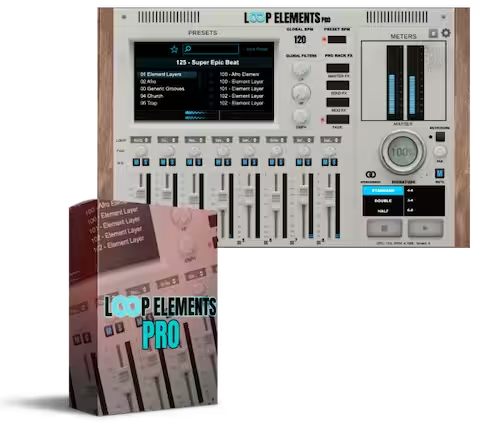
The core mechanic is simple: every preset runs eight loops simultaneously through a mixer. Drums, bass, pads, horns, strings, percussion — one element per channel, all blendable in real time. You don’t play the parts. You mix them. That’s the whole concept, and for the specific use case it targets, it’s the right one.
The 8-Channel Mixer — Where It Actually Earns Its Keep
I’ll be honest: I was skeptical of this feature before I used it live. An 8-channel mixer inside a loop instrument sounded like a solution looking for a problem. Then the drummer at the church I was running tracks for came in three bars early, and I killed his drum channels in two taps without touching anything else. Nobody in the room noticed. That’s when I understood what this thing is actually for.
Each channel carries one element of the preset — typically kick, snare, bass, rhythm pad, lead pad, horns, strings, and a wildcard that changes per preset. Solo, mute, volume, pan — all accessible per channel without touching your DAW. For live worship specifically, that level of granular control during a performance is something a stereo loop simply cannot give you.
V1.5 added linked faders — group two or three channels and move them as a unit. Sounds minor. In practice, fading a string stack without disrupting the internal balance between layers is something you’d do constantly in a service, and doing it as one gesture instead of three matters when your hands are already busy. This is the kind of feature you don’t notice in demos but reach for every set once you have it.
400+ Presets — The v1.5 Additions in Detail
The original version shipped with around 250 presets. Version 1.5 adds 150+ more, pushing past 400. I went through the new additions over several sessions and the quality holds — nothing that felt like padding or last-minute additions to inflate a number.
The standout from the new batch is the Smack City pack — 60+ presets built around that compressed, punchy gospel feel that large church productions have been running for the last few years. Tight kick, slamming snare, the kind of sound that moves a room. The Smack Claps bank (75+ samples) sounds like actual room-recorded claps rather than a library hit with the transient filed off. That difference matters in a mix.
The swing and 9/8 timing variants are genuinely useful and slightly underrated in the marketing. Worship music doesn’t always sit on a straight 4/4. Having rhythmically varied versions of the same arrangement means flexibility mid-service without reprogramming anything. V1.5 also moved the Loop Browser inside the Channel FX panel, which sounds like a minor UX tweak but removes real friction when you’re switching presets between songs and don’t want to close your effects chain to do it.
Setlist Mode — The Feature That Separates This From Everything Else
Before Setlist Mode existed, the workflow between songs was: navigate the browser, find the next preset, load it, set the tempo, get ready. During a live service. In front of people. With whatever pressure the moment has on it.
Setlist Mode lets you pre-build up to 12 songs in sequence — with tempo, key, and preset locked for each — and step through them with a single button press or MIDI trigger. I run a Korg NanoKontrol2, and the NanoKontrol integration means I navigate the entire set from hardware buttons without touching the screen. Build the list in rehearsal, step through it on Sunday. The transition is clean, the next preset is already loaded, and the worship leader can change her mind between songs without sending me into a panic.
The ceiling is 12 songs per list with no nesting. For most church services that’s fine. Touring productions with variable-length sets or multiple service formats will hit that wall. It’s not a dealbreaker — you can build multiple lists and switch between them — but it’s worth knowing before you buy.
Vari-8 FX — Useful Live, Limited in the Studio
The Vari-8 FX section gives you per-channel effects processing — reverb, delay, filter, compression, saturation — each controlled through a single macro knob. One turn moves from dry to fully processed. That intentional simplicity is the right call for live performance. You’re not precision-engineering reverb tails mid-service. You want space, or you want it tight, and you want to get there in one gesture.
In the studio it’s a different conversation. I found myself routing channels out to my DAW’s native effects for anything that needed actual precision — specific pre-delay on a reverb, a particular delay time to match the song’s grid. The macro approach isn’t a flaw, exactly; it’s a design choice that reflects the plugin’s priorities. But if you’re hoping to use Loop Elements Pro as a production-complete solution rather than a performance instrument that also works in sessions, calibrate your expectations accordingly.
Who Actually Gets the Most Out of This
Live Worship Musicians
This is what it was built for and where it works best. Music directors running tracks for a live band, keyboard players who need a full production layer behind them, small churches with limited live musicians — the Setlist Mode and mixer control exist specifically for this workflow, and it shows in every design decision. If this is your use case, the plugin earns its price without much debate.
Gospel & Worship Producers
The preset library is a legitimate time-saver in sessions. Rather than building drum patterns, bass lines, and pad progressions from scratch on every track, you load a Loop Elements Pro preset as a foundation and build around it. Individual channel outputs let you route stems into separate DAW tracks for additional processing. It’s not the only thing in your session, but it handles the structural loop work faster than anything else in this category.
One-Person Production Setups
Small church productions, home studios, content creators making worship content — anywhere one person is covering the ground a full production team would normally handle. The standalone app matters here: open it directly, skip the DAW entirely, and plug straight into the house system. V1.5 brought standalone up to full feature parity with the plugin version, which closes the gap that used to push live performers back into a DAW host.
What I’d Flag Before Buying
No AAX support means you can’t run it natively inside Pro Tools. That’s a real issue for anyone whose studio is Pro Tools-centric. The individual channel stems don’t export natively, so getting discrete outs into a mix requires routing through your DAW’s audio interface assignments. The UI can get dense on a 13-inch laptop screen — manageable, but you’ll be zooming and scrolling more than you’d like. And if you’re buying this expecting a full-featured effects processor, you’ll want to pair it with your DAW’s native chain for anything precise.
None of those are reasons not to buy it for its intended use. They’re reasons to know what you’re getting before you’re standing in front of 400 people at 10:58 on a Sunday morning.
Pros & Cons
What Works
- 8-channel mixer — real live control, not just stereo playback
- Setlist Mode (12 songs, MIDI-navigable via NanoKontrol)
- 400+ presets with genuine quality — nothing feels like filler
- Linked faders simplify live mixing of layered stacks
- Smack Claps bank sounds like real room claps
- Swing and 9/8 timing variants for non-4/4 worship songs
- Loop Browser accessible inside Channel FX panel
- Standalone app at full feature parity (v1.5)
- VST3 and AU — works in every major DAW
Limitations
- No AAX — Pro Tools users need a workaround
- Setlist Mode capped at 12 songs per list, no nesting
- Vari-8 macro FX too simplified for studio precision
- No native stem export from individual channels
- UI gets cramped on 13-inch screens
Quick Specs
| Developer | Gospel Producers |
| Current Version | v1.5 (2026) |
| Plugin Formats | VST3, AU, Standalone (AAX not supported) |
| Platforms | Windows 10/11 · macOS 10.13+ (Intel & Apple Silicon) |
| Preset Count | 400+ (150+ added in v1.5) |
| Mixer Channels | 8 per preset — individually mutable, soloable, linkable |
| FX Engine | Vari-8 FX (reverb, delay, filter, compression, saturation) |
| Setlist Mode | Up to 12 songs per list, MIDI-navigable |
| Hardware Control | Korg NanoKontrol2 (auto-mapping, no setup required) |
| New in v1.5 | Smack City pack, Smack Claps (75+), swing/9/8 variants, linked faders, Loop Browser in Channel FX, standalone parity |
| Available At | vstor.me — Loop Elements Pro VST |
Verdict
Our Rating
If you’re a live worship musician and you don’t already have a loop instrument that gives you per-channel control and a real setlist workflow, this is the one to get. The v1.5 update isn’t cosmetic — Setlist Mode and standalone parity alone change what the plugin can do in a real service context. The preset library is good enough that you’ll pull from it rather than constantly browsing for something better.
The limitations are real and worth knowing. No AAX, the 12-song ceiling, the simplified FX engine. None of them are disqualifying for the instrument’s primary audience. They matter more if you’re trying to stretch this into use cases it wasn’t designed for.
Gospel Producers built a specialist tool. If you’re in its specialty, it does its job better than anything else in this space.
Available now at vstor.me — instant download, Windows & Mac compatible
📺 Also on vstor.me: FabFilter Pro-Q 4 Review — The Gold Standard EQ Plugin
