Sale!

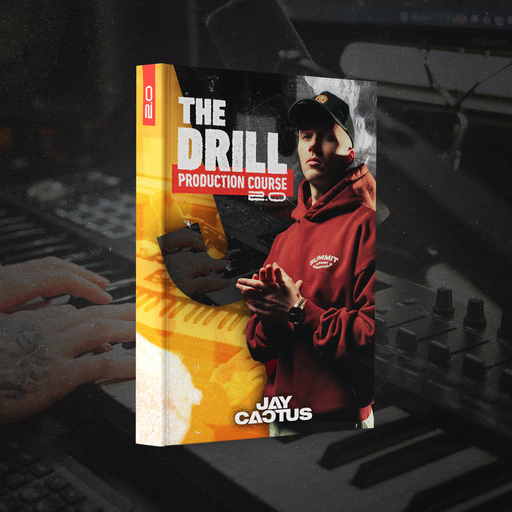
Jay Cactus The Drill Production Course 2
Jay Cactus The Drill Production Course 2 – Project-based drill production course with DAW templates, stems, and MIDI. Learn to produce pro drill beats from session setup to mix-ready exports.
Original price was: $240.00.Current price is: $75.00.

Description

Your drill beats lack weight. The drums sound thin, and you spend more time tweaking than actually finishing tracks. Jay Cactus The Drill Production Course 2 fixes that β€” project-based lessons, real DAW templates, and tools you can load up right now.

Why This Course Works

Drill production comes down to precision β€” tight drums, dark melodies, and a mix where the 808 hits without burying the snare. This course gives you a repeatable workflow built from years of actual drill production, not theory.

You follow complete beats from a blank session to a mix-ready master. We’ve included templates for Ableton Live, FL Studio, and Logic Pro, so you’re not starting from scratch. By the end, you’ll have a finished drill beat, stems you can export, and a process that works for every track after that.

What You’ll Learn

  • Drum programming and layering that actually hits
  • Building drill swing and hi-hat patterns that groove
  • Making dark melodies with basic sound design
  • Mixing: compression, saturation, and keeping the low end tight
  • Arranging a 3–4 minute track that holds attention
  • Exporting stems, building presets, prepping files for release

βœ” What’s Included

  • βœ“ 13 video modules (project-based lessons) – 6+ hours of content
  • βœ“ DAW templates (Ableton/FL/Logic compatible)
  • βœ“ WAV stems and MIDI for every example
  • βœ“ Drum one-shots and custom 808 presets
  • βœ“ Mix session files and reference chains
  • βœ“ License for commercial use

Most drill courses leave you watching β€” this one gets you building. Simply load a template, follow the module, and walk away with a track that’s arranged, mixed, and ready to go.

Limited-Time Sale β€” Save 69%

$75
$240

One payment β€” lifetime access

β–Ά Get Instant Access β€” $75

⚑ Instant Download
πŸ”’ Secure Checkout
πŸ“¦ 1.4 GB Total

Course Breakdown β€” 13 Modules

πŸ₯ Phase 1 β€” Foundation & Drums

01

Session Setup & Drum Selection

Load templates, choose kicks, snares, and percussion that lock together from bar one.

02

Sound Choice & Drill Sample Selection

Identify which samples fit a drill mix and which don’t β€” build your core palette.

03

Kick & Snare Layering

Layer for weight and punch using compression, transient shaping, and phase alignment.

04

Hi-Hat Programming & Swing

Program off-grid hi-hats, drill swing patterns, and the signature rolling rhythm.

05

Percussion & Ad-Libs

Add claps, rimshots, and fills that create movement between the main hits.

🎹 Phase 2 β€” Melody & Bass

06

Melodic Foundations

Build dark chord progressions and tense atmospheres that define the drill sound.

07

Melody & Counter-Melody Design

Layer leads, octaves, and call-and-response techniques across the arrangement.

08

808 Bass Programming

Tune, glide, ghost notes β€” lock the sub-bass with the kick for maximum impact.

🎚️ Phase 3 β€” Arrangement, Mix & Delivery

09

Arrangement & Song Structure

Structure intros, verses, hooks, bridges, and outros that flow naturally.

10

Transitions & FX

Risers, drops, tension builds, and production FX that keep the track moving.

11

Mixing β€” EQ & Compression

Balance every element with surgical EQ cuts and dynamic control across the mix bus.

12

Advanced Mixing β€” Saturation & Bus Routing

Parallel processing, saturation, and low-end management for a polished commercial sound.

13

Export & Delivery

Mastering-safe exports, metering, loudness targets, and stem organization for release-ready delivery.

You’ll also find related resources like our Sample Packs and Artist Series Vol.1 to speed up your workflow even more.

For a deeper look at drill arrangement and rhythm, check out Sound On Sound β€” Beat Making and Ableton’s groove docs.

Jay Cactus The Drill Production Course 2 β€” Frequently Asked Questions

Compatibility & Setup Questions

🎧  Compatibility & Platform

Which DAWs are compatible with this course?

All major DAWs work with the core files. We’ve included templates for Ableton Live, FL Studio, and Logic Pro. The WAV stems, MIDI files, and drum one-shots are universal β€” drop them into Cubase, Pro Tools, Studio One, or any DAW that supports standard audio and MIDI formats. Additionally, the mixer chains work with Ableton Live 11/12, FL Studio 21, and Logic Pro X.

Do I need prior drill production experience?

Not at all. We structured this course for intermediate producers, but beginners can follow along too. Module 1 covers session setup and fundamental drum selection, while later modules dive into advanced mixing and arrangement. If you know basic DAW navigation, you’re ready. On top of that, the templates come pre-routed and labeled, so you can just open, listen, and learn.

What file formats are included in the download?

The course ships with 24-bit WAV stems and one-shots, standard MIDI files (format 0), DAW-specific template files (.als, .flp, .logicx), and preset banks for Serum and Massive. You’ll stream video modules through the download page. All audio files run at 44.1kHz / 24-bit for broadcast-quality production. The total download size comes to approximately 1.4 GB.

Licensing, Access & Purchase Questions

πŸ“„Β  Licensing, Access & Purchase

Can I use the course materials in commercial releases?

Yes β€” every purchase includes a commercial license. You can sell beats and instrumentals made with the included stems, presets, and one-shots without paying any royalties. However, vocal stems from example tracks are for learning reference only, and you cannot resell them. The templates and lesson content are for your personal use.

How do I access the content after purchasing?

You’ll receive an instant download link on the order confirmation page and through email. The ZIP file contains all templates, stems, MIDI, and presets β€” organized by module. Plus, video lesson streaming becomes available on the downloads page for registered customers. The download link stays active for 7 days. No DRM, no subscriptions β€” you own it forever.

What’s the refund policy on digital courses?

Because of the digital nature of the product, all sales are final. That said, if you run into technical issues β€” corrupted downloads, broken template files, or inaccessible videos β€” reach out to our support team and we’ll fix it right away. We stand behind the quality of this course and every sound included.

Wrap Up

You know the feeling β€” hours into a beat and it still doesn’t hit. This course helps get you past that. So load a module, open the template, and finish a track you can actually use. After checkout, grab the download, import the sessions, and get back to making music β€” not setting up.