

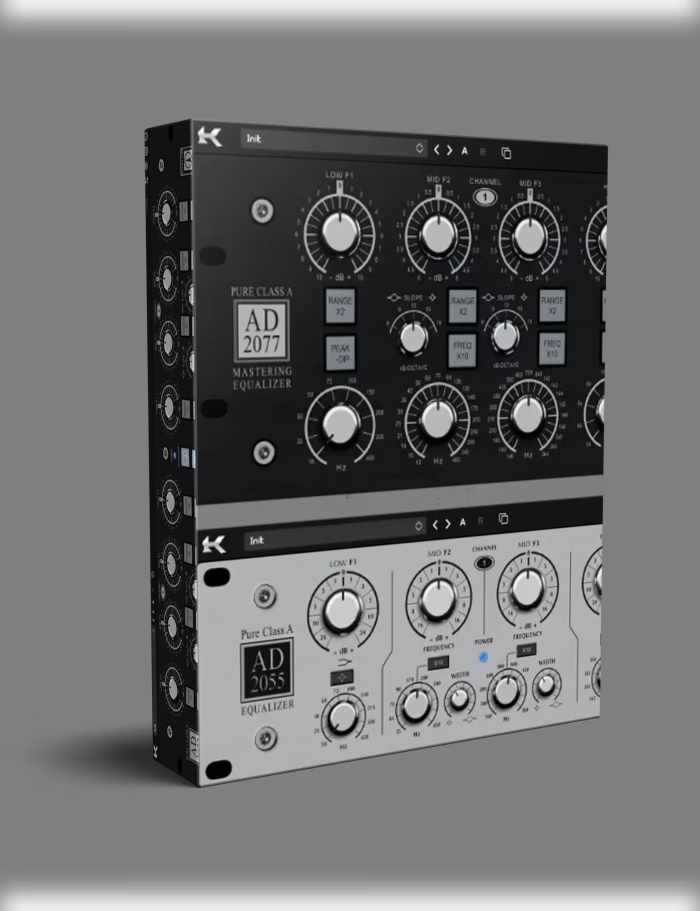

A great mix doesn’t happen by accident. Vocals sit forward without piercing. Low end stays thick without clouding the mids. The whole track breathes like it passed through a console worth more than a car. Raw talent and expensive gear help, but they’re not the whole story. More often than not, the missing piece is the Kazrog Avalon EQ Bundle: two plugins that model the exact analog circuitry of the Avalon Design 737 and 747, delivering genuine tube stage and discrete Class-A topology inside your DAW.
If stock EQs sound thin and digital plugins leave your tracks feeling sterile, this bundle addresses the problem directly. This isn’t a generic emulation with a saturation knob attached for show. In fact, Kazrog modeled the actual transformer curves, harmonic distortion profiles, and frequency interactions of the hardware units. As a result, you get an EQ and compressor combo that behaves like a real channel strip — not a plugin pretending to be one.
What the Kazrog Avalon EQ Bundle Brings to Your Mix
This bundle includes two plugins that work as a complete tracking and mixing chain: the Avalon 737 (mic preamp, EQ, and optical compressor in one) and the Avalon 747 (dual-channel tube EQ and compressor with six-band graphic EQ). Together, they cover everything from tracking vocals through a pristine preamp to buss compression that glues a mix without squashing it.
The Avalon 737 Plugin — Preamp, EQ, and Compressor in One
The 737 is the workhorse. Producers use it on vocals, bass, acoustic guitar, and overheads because the preamp stage adds harmonic richness without fatiguing the ear. Specifically, Kazrog’s modeling captures the four-band parametric EQ with the same frequency centers as the hardware: Low (35–400 Hz), Lo Mid (140–900 Hz), Hi Mid (500–4500 Hz), and High (2.5–20 kHz). What’s more, the optical compressor section follows Avalon’s proprietary design — a photocell-based gain reduction circuit that behaves differently from VCA or FET compressors. Consequently, attack times feel slower and more musical, making the 737 particularly effective on vocals and bass where you want leveling without audible pumping.
The Avalon 747 Plugin — Dual-Channel Tube EQ and Dynamics
The 747 adds a six-band graphic EQ alongside the same high/low filters and compressor section. This is the plugin you reach for when a track needs surgical frequency shaping followed by gentle compression. Additionally, the tube stage in the 747 runs hotter than the 737’s, adding more saturation when you push the input gain. Mastering engineers frequently use it as a final stage that adds harmonic content without clouding transients.
In the Kazrog emulation, that behavior is modeled across the full gain range — from clean operation through subtle harmonic drive all the way to where the tubes begin to saturate naturally.
Why Analog Modeling Matters for Your Workflow
Digital EQs are clean, precise, and repeatable. However, precision isn’t always what a track needs. For example, apply 3 dB of boost at 5 kHz with a digital EQ, and the entire frequency gets uniformly louder — including the harsh harmonics you didn’t want to emphasize. Analog EQs, particularly the Class-A discrete designs in Avalon gear, apply gain differently.
The boost interacts with the circuit’s natural harmonic distortion, emphasizing the fundamental frequency more smoothly while the upper harmonics roll off naturally. The Kazrog Avalon EQ Bundle models this behavior through component-level circuit simulation. As a result, every knob movement responds the way it would on the hardware.
What This Sounds Like in Practice
Try boosting a vocal’s presence region with a stock parametric EQ, then dial in the same curve on the Avalon 737 plugin. The Kazrog version adds 2nd-order harmonic content that makes the vocal feel warmer — even before compression. Engineers who mix hybrid setups pay thousands for this behavior. With this bundle, you get it inside your existing workflow — no patchbays, no cable management, no maintenance. For producers working in Ableton Live or any major DAW, this means analog-grade processing without leaving the box.
Who Should Use the Kazrog Avalon EQ Bundle
This bundle fits three specific workflows:
- Tracking engineers: Route your mic through the 737 preamp simulation while recording. The latency is low enough for real-time monitoring, and the optical compressor catches peaks before they hit your DAW.
- Mixing engineers: Use the 737 on individual channels (vocals, bass, acoustic guitar) and the 747 on subgroup busses or the master. The six-band graphic EQ on the 747 works well for final shaping before your limiter.
- Producers who DI or record at home: If your signal chain is a microphone into an audio interface, the analog modeling in this bundle adds the coloration missing from budget preamps. Send a DI bass through the 737 and get a sound that feels tracked through a console — without buying a $3,000 rack unit.
These plugins integrate with any DAW that supports VST3, AU, or AAX — including Logic Pro, Cubase, Studio One, Pro Tools, Reaper, and FL Studio. For system-specific tuning, Sound On Sound’s audio optimization guide covers buffer settings and driver configuration to help minimize latency when tracking through analog model plugins.
Kazrog’s Circuit Modeling Philosophy
Analog emulations vary in quality. Many plugins take a shortcut: grab an EQ curve, add a saturation algorithm, call it “analog modeled.” Kazrog works differently. Instead, each component in the signal path — resistors, capacitors, transformers, tubes — is individually characterized. The interaction between stages is then calculated in real time.
How Component-Level Detail Affects Your Sound
That’s why the Avalon EQ plugins respond differently depending on gain staging. Push the input harder, and the EQ behaves differently — just like the hardware. Similarly, the compressor’s attack and release times shift depending on program material, matching the photocell behavior of the original optical circuit.
This level of detail rewards experimentation. For instance, drive the 747’s input stage while cutting the graphic EQ — you’ll get saturation on the harmonics without the low-mid buildup that usually follows aggressive EQ cuts. As a result, you get behavior that only emerges when the software respects the original circuit rather than approximating it.
What’s Inside the Bundle
✅ What’s Included
- ✓ Avalon 737 Plugin – Mic preamp, 4-band parametric EQ, optical compressor
- ✓ Avalon 747 Plugin – Dual-channel tube EQ, 6-band graphic EQ, compressor
- ✓ Component-level circuit modeling – True transformer and tube stage emulation
- ✓ Preset library – 50+ factory presets for vocals, bass, guitars, drums, and busses
- ✓ VST3, AU, and AAX formats – Works in every major DAW on Mac and Windows
- ✓ Zero-latency tracking mode – Use while recording with real-time monitoring
- ✓ Scalable UI – Resizable interface for high-DPI displays
- ✓ 100% royalty-free – No usage restrictions on commercial releases
Practical Signal Chains with the Avalon EQ Bundle
Here are three setups tested in real sessions using the Kazrog Avalon EQ Bundle:
Vocal Chain
Avalon 737 preamp stage → 3–6 dB of optical compression (slow attack, auto-release) → 2–3 dB high shelf boost at 8 kHz → small cut at 300 Hz. The preamp stage adds harmonic density, the compressor smooths dynamics without pumping, and the EQ adds air without sibilance buildup. For additional depth, send to a plate reverb from our VST plugins collection.
Bass Chain
Avalon 747 preamp → low-shelf boost at 60 Hz → compressor with fast attack and medium release (3:1 ratio) → slight high-mid boost at 800 Hz for pick attack definition. The 747’s tube stage gives the low end a “bloom” that DI bass often lacks.
Mix Buss Chain
Avalon 747 with both channels linked → gentle 2:1 compression, barely 2 dB of gain reduction → subtle high shelf if needed. The six-band graphic EQ lets you address room mode issues on the buss without inserting a separate EQ. Subsequently, you get a cohesive sound across dynamic material without over-processing individual tracks.
📋 Frequently Asked Questions
✓ What DAWs are supported?
The bundle supports VST3, AU, and AAX formats. Runs on macOS 10.12+ (Intel and Apple Silicon native) and Windows 7+ (64-bit). Works with Ableton Live, FL Studio, Logic Pro, Cubase, Studio One, Pro Tools, Reaper, and any DAW accepting these formats.
✓ Can I use these plugins commercially?
100% royalty-free. Use them on streaming platforms, sync licensing for TV and film, YouTube content, client projects, or personal work. No additional fees or reporting required.
✓ Do I need the physical hardware?
Not at all. This is a standalone software product. No iLok, dongle, or physical hardware required. The license is tied to your machine via a standard serial key.
✓ How much CPU do they use?
Component-level modeling is more CPU-intensive than simplified emulations, but Kazrog’s engine is well-optimized. Expect roughly 2–5% CPU per instance on a modern multi-core processor. ECO mode reduces CPU load without noticeably changing audio quality.
✓ 737 vs 747 — what’s the difference?
The 737 is a single-channel strip with mic preamp, 4-band parametric EQ, and optical compressor — ideal for tracking and channel processing. The 747 is a dual-channel unit with the same tube EQ and compressor plus a 6-band graphic EQ. The 747 runs its tube stage at higher voltage for more saturation when pushed. Many use the 737 on individual tracks and the 747 on the mix buss.
✓ How do I install and authorize?
After purchase, download the installer from your account and run it. Plugins install to your system’s default VST/AU/AAX folders. The license key is emailed to you — enter it in the plugin’s authorization window. No iLok, no cloud activation, no ongoing internet requirement.
✓ Can I demo before buying?
Yes. A 14-day fully functional demo is available from Kazrog’s site. The demo includes all features with occasional audio muting between parameter changes. No credit card required for the trial.
✓ Is Apple Silicon supported?
Both plugins run natively on Apple Silicon (M1–M4) without Rosetta. Intel Macs and Windows x64 are fully supported as well.
The Bottom Line on the Kazrog Avalon EQ Bundle
You can mix with stock plugins. They’ll get you there eventually. But if you’ve been spending extra hours trying to make digital EQs sound “analog” with saturation plugins, multiband processing, and automation, there’s a simpler path. The Kazrog Avalon EQ Bundle puts two of the most respected analog processors in music production history inside your DAW — modeled at the component level, tested by engineers who own the hardware, and priced at a fraction of what a single rack unit would cost.
On one hand, the 737 handles tracking and channel processing with warmth that stock EQs can’t match. On the other hand, the 747 brings dual-channel tube processing and graphic EQ to your mix buss. Together, they cover the ground between “recorded” and “mixed” — without the steep learning curve of complex hardware emulations that require you to study schematics before you can use them.
In short, if your mixes need the weight and presence that only real analog circuitry delivers — but your budget and studio space don’t allow a rack full of outboard gear — this bundle is the solution. Load it, dial it, and hear what your tracks have been missing.
Be the first to review “Kazrog Avalon EQ Bundle – Analog Tube EQ & Compressor Plugins”
You must be logged in to post a review.
Related products
VST Instruments

Sound Loops & Samples
VST Plug-ins
VST Plug-ins

VST Instruments

VST Plug-ins
VST Plug-ins
Reviews
There are no reviews yet.