

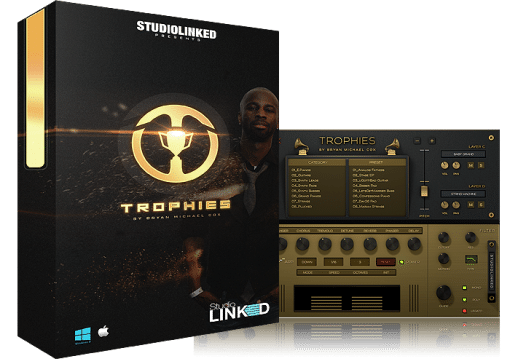


If you’re on the hunt for a virtual instrument that delivers professional, radio-worthy sounds to your tracks, take a close look at the StudioLinked Trophies VST. Developed with nine-time Grammy-winning producer Bryan Michael Cox, this plugin packs 500 handpicked presets across 17 different instrument types. Whether you make R&B, hip-hop, pop, or electronic music, having sounds shaped by someone who’s made real hits can bring that studio-quality finish to your music.
The StudioLinked Trophies VST isn’t just another library of samples—it’s a set of signature tones pulled from actual charting records. Every preset is built to fit nicely into a mix from the moment you load it, which saves you time tweaking and processing. The layout is clean and easy to understand, so you spend less time menu-diving and more time making music.
What Comes with the StudioLinked Trophies VST
- 500 signature presets – acoustic guitars, electric pianos, ambient pads, mono leads, drum kits, and more
- 17 instrument categories – sorted for fast navigation
- Motion effects knob – brings life and change to any patch
- 16-step arpeggiator – creates rhythmic patterns and interesting riffs
- Pitch, glide, and octave controls – lets you adjust the feel of each sound
- Built-in effects – reverb, delay, flanger, chorus, tremolo, phaser, detune
- ADSR envelope – shapes the attack, decay, sustain, and release
- Multiple format support – VST, Audio Unit, AAX (64-bit & 32-bit)
- Lightweight performance – runs well on most computers
How to Use Trophies VST in Your Productions
Many producers deal with generic sounds that don’t quite match the mood they’re going for. The StudioLinked Trophies VST tackles that by giving you sounds that already have a professional edge. Since Bryan Michael Cox had a hand in picking and designing these presets, you’re getting his sense of what works in today’s music. That’s a real benefit when you want your tracks to stand up next to what’s playing on the radio.
The plugin works simply. Load a preset, play a chord or two, and you’ll hear how the sounds have weight and personality without needing extra plugins. The Motion knob is especially handy—it introduces gentle movement or rhythmic changes that stop pads and leads from feeling flat. Paired with the 16-step arpeggiator, you can build shifting patterns quickly, not after hours of work.
It works with almost everything. The StudioLinked Trophies VST installs as a VST, Audio Unit, or AAX plugin, so it runs in just about every major DAW on Windows and Mac. The only note is that ProTools users will need the AAX version, which comes in the package. For everyone else, it’s basically plug it in and go.
What You Get After Buying
- StudioLinked Trophies VST plugin – complete version, no monthly payments
- 500 presets in 17 categories – load and play right away
- Offline installer – doesn’t need constant internet
- Step-by-step installation guide – walks through Windows and Mac setup
- License key (if required) – sent to your email immediately
- Lifetime use on one machine – no yearly fees
Tech Specs and System Needs
Mac OS X: 10.7 or newer (covers macOS Sierra, Mojave, Catalina, Big Sur, Monterey)
Windows: Vista, 7, 8, 8.1, 10 (32-bit or 64-bit)
Free disk space: 2 GB minimum (more is better for bigger libraries)
RAM: 4 GB minimum (8 GB or above recommended for larger projects)
DAW compatibility: FL Studio, Ableton Live, Logic Pro, Cubase, Studio One, Reaper, ProTools (AAX), and others
Setting Up the StudioLinked Trophies VST
Once you buy it, you’ll get a download link straight away. The package is a ZIP or RAR file with the installer and any license files inside. Run the installer, follow the steps, and restart your DAW. The plugin will show up in your instrument menu, ready to load any of the 500 presets. If you hit any snags, the included guide explains common fixes for both Windows and Mac.
Questions People Usually Ask
Can I use these sounds in commercial tracks?
Yes. Once you purchase the StudioLinked Trophies VST, you’re free to use the sounds in your commercial music without extra royalty payments. The license gives you lifetime use in your own productions.
Will it run on Apple Silicon (M1/M2/M3) Macs?
Most users find it works well on Apple Silicon Macs using Rosetta 2. For native Apple Silicon support, keep an eye on the developer’s site for news. The plugin works with macOS versions starting from 10.7.
Does it work in ProTools?
Yes, the AAX version is included, so it runs directly in ProTools without extra software. Just pick the AAX installer during setup if ProTools is your main DAW.
What if I run into installation trouble?
Most installation problems get solved by making sure your DAW is updated, your operating system meets the requirements, and you restart your computer after installing. The included guide covers typical solutions. If you still need assistance, reach out to the seller’s support.
Are updates free?
It depends on the developer’s policy. Usually, bug fixes and small updates are free, while bigger version jumps might cost extra. Check the product page for the specifics on their update policy.
Should You Get the Trophies VST?
The StudioLinked Trophies VST brings together a solid bundle: 500 professionally crafted presets, input from a hitmaker, and a simple interface that stays out of your way. It’s a plugin that values your time—you get sounds that are usable straight off, without constant adjustments. For producers looking to add some Grammy-winning flavor to their tracks without dropping thousands on studio time, this makes sense.
Whether you’re writing film music, producing vocals, or putting together electronic beats, having a flexible sound collection like this can move your workflow faster and improve what you make. The StudioLinked Trophies VST does what it says: good sounds, dependable performance, and a bit of that hit-making magic.
Internal links: Check out our VST Plugins collection for more instruments, or take a look at our guide on installing VST plugins on Mac if you’re just starting out.
External references: Learn more about Bryan Michael Cox’s work on his official website, or read about VST technology on the Steinberg developer portal.
Be the first to review “StudioLinked – Trophies by Bryan Michael Cox VST”
You must be logged in to post a review.
Related products
VST Instruments
VST Instruments
VST Instruments
VST Instruments


VST Instruments
VST Instruments
VST Instruments

Bundle Deals
Reviews
There are no reviews yet.