

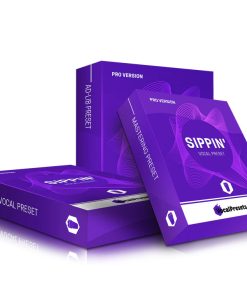
WavMonopoly Trap, Hip Hop & RnB Vocal Preset Chain Pack for FL Studio & Logic X


Original price was: $200.00.$35.00Current price is: $35.00.
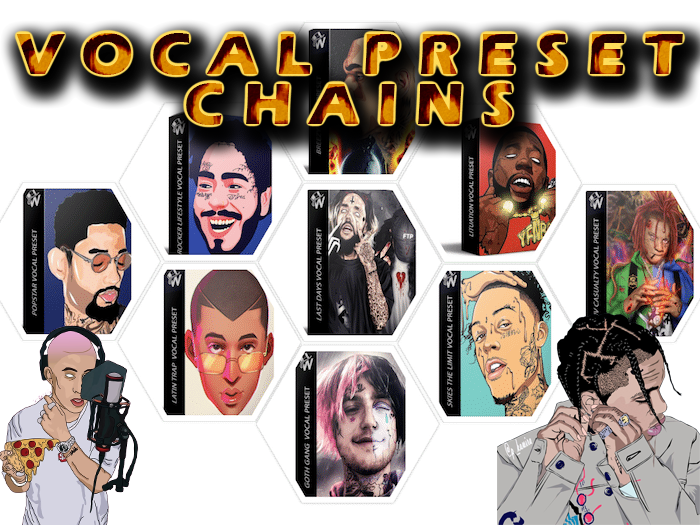
WavMonopoly Vocal Preset Chain for FL Studio & Logic X gives you professional vocal templates for artists like Drake, Travis Scott, Lil Baby. Get radio-ready vocal sounds instantly with stock plugins.
WavMonopoly Vocal Preset Chain: Professional Vocal Templates for Modern Producers
If you’re looking for that polished, radio-ready vocal sound without spending hours tweaking compressors and EQs, the WavMonopoly Vocal Preset Chain gives you exactly what you need. This collection brings together professionally designed vocal templates that capture the signature sounds of today’s biggest artists, all ready to load into your FL Studio or Logic X sessions.
What makes these presets different? They’re not just simple effect chains – each template recreates the complete vocal processing approach used by chart-topping producers. You get the exact compressor settings, EQ curves, reverb spaces, and delay throws that give artists like DaBaby, Drake, Lil Baby, and Travis Scott their distinctive vocal presence. It’s like having a professional mixing engineer right in your DAW.
🎤 What’s Included in the WavMonopoly Vocal Preset Chain
- DaBaby Yeah Yeahh Vocal Template – That signature energetic, upfront delivery
- Drake Six God Vocal Preset Pack – Smooth, polished R&B vocals
- Lil Baby “Baby Going Crazy” Vocal Presets – Aggressive trap delivery
- Gunna “Drowning in Drip” Vocal Presets – Melodic, flowing trap style
- PnB Rock “Popstarr Lifestyle” Vocal Pack – Blend of singing and rapping
- Tory Lanez “Flixtape” Vocal Preset Pack – Versatile singing/rapping hybrid
- Juice WRLD Vocal Preset Pack.flp – Emotional, melodic rap style
- Lil Baby Vocal Preset Pack w/ Adlibs.flp – Complete with ad-lib processing
- Lil Mosey Vocal Effect Preset Packs.flp – West Coast influenced processing
- Travis Scott Astroworld Vocal Preset Pack w/ Adlibs.flp – Atmospheric, psychedelic effects
- Young Thug FLP Vocal Preset Pack w/ Adlibs (Stock) – Unique, creative vocal processing
- Plus 8 Additional Stock Plugin Preset Packs including Breezy, Goth Gang, Latin Trap, and more
How These Vocal Presets Work in Your DAW
Each WavMonopoly vocal preset comes as a complete project file or preset chain that uses mostly stock plugins from FL Studio or Logic Pro X. This means you don’t need expensive third-party plugins to get professional results. The templates organize all the processing in the right order: de-essing, compression, EQ, saturation, delay, and reverb – each carefully tuned for specific vocal styles.
The only exception is Auto-Tune, which some templates include. If you don’t own Auto-Tune, you can easily replace it with FL Studio’s Fruity Pitcher or Logic’s Flex Pitch. Every template includes a “How to Use” guide that walks you through loading the presets and adapting them to your own voice.
🚀 Get the WavMonopoly Vocal Preset Chain
Professional vocal processing in seconds, not hours
Add to Cart – WavMonopoly Vocal Presets
Instant download after purchase • Works with FL Studio 11+ & Logic Pro X 10.4.8+
Why Producers Choose WavMonopoly Vocal Presets
Time is the most valuable resource in music production. Instead of spending hours trying to recreate vocal sounds from reference tracks, these presets give you professional starting points that are 90% of the way there. You can focus on performance and creativity rather than technical processing.
The templates work with your existing setup. Since they primarily use stock plugins, you don’t need to invest in additional software. This makes the WavMonopoly Vocal Preset Chain accessible to producers at any level, from beginners working on their first tracks to professionals needing quick turnaround times.
Having consistent vocal processing across projects also helps develop your signature sound. Once you find presets that work well with your voice or your artists’ voices, you can save them as your own templates, ensuring your releases maintain professional quality every time.
Technical Details & Compatibility
DAW Compatibility: FL Studio 11 and newer versions • Logic Pro X 10.4.8 and newer versions
Plugin Requirements: Primarily uses native stock plugins included with your DAW. Auto-Tune is referenced in some templates but can be replaced with stock pitch correction tools.
File Format: FLP files for FL Studio • Logic Project files for Logic Pro X
System Requirements: Windows 7/8/10/11 or macOS 10.12+ • 4GB RAM minimum • 500MB free disk space
Installation: Simply download the ZIP file, extract it, and place the preset files in your DAW’s template/preset folder or open directly.
❓ Frequently Asked Questions
Do I need expensive plugins to use these vocal presets?
No, that’s one of the best features of the WavMonopoly Vocal Preset Chain. Almost all processing uses stock plugins that come with FL Studio or Logic Pro X. The templates show you how professional results can be achieved with tools you already own.
What if I don’t have Auto-Tune?
No problem. The included guide shows how to replace Auto-Tune with FL Studio’s Fruity Pitcher or Logic’s built-in pitch correction tools. The presets are designed to be flexible and adaptable to your available plugins.
Can I use these presets for singing and rapping?
Yes, the collection includes templates optimized for different vocal styles. Some are specifically designed for aggressive trap rap, others for smooth R&B singing, and some for melodic rap. There are presets suitable for virtually any modern vocal delivery.
How do I adapt these presets to my own voice?
Each preset serves as a starting point. The guide explains which parameters to adjust for different vocal types – things like compressor threshold, EQ frequencies, and reverb levels. You’ll learn how to tweak the settings to match your specific vocal characteristics.
Are updates included with my purchase?
When you purchase through VSTor.me, you receive the complete current version of the WavMonopoly Vocal Preset Chain. Any major future updates would be announced through our newsletter, but the current version provides everything listed in the product description.
Getting the Most from Your Vocal Presets
Start by choosing a preset that matches the vibe you’re going for. Load it into a new track in your DAW and record your vocals through the chain. Don’t be afraid to experiment – try different presets even if they’re labeled for different artists. Sometimes a “Drake” preset might work perfectly for an R&B singer, or a “Travis Scott” preset could add interesting atmosphere to a melodic rap track.
Pay attention to the signal flow in each template. Notice how the producers have ordered the effects: cleanup first (de-essing, noise reduction), then dynamics (compression), then tone shaping (EQ, saturation), and finally spatial effects (delay, reverb). This logical approach to vocal processing will improve your own mixing skills over time.
Save your modified versions. When you find settings that work particularly well for your voice, save them as your own custom presets. This builds your personal library of go-to vocal chains, speeding up your workflow on future projects.
🎵 Ready to Upgrade Your Vocal Sound?
Join thousands of producers using WavMonopoly presets for professional results
Add WavMonopoly Vocal Preset Chain to Cart
Instant download • 100% working presets • No additional plugins required
For more vocal processing tools and effects, check out our Vocal Presets category where you’ll find additional resources for vocal production. You can also explore our full collection of FL Studio presets, or build complete Hip Hop, Trap, and RnB sessions with the Ultimate Producer Bundle.
The WavMonopoly Vocal Preset Chain represents years of professional mixing experience distilled into ready-to-use templates. Whether you’re working on trap bangers, R&B ballads, or hip-hop anthems, having these professional starting points can transform your vocal productions from amateur to industry-standard in minutes.
Be the first to review “WavMonopoly Trap, Hip Hop & RnB Vocal Preset Chain Pack for FL Studio & Logic X”
You must be logged in to post a review.
Related products

Sound Loops & Samples
Bundle Deals
Bundle Deals
Bundle Deals

Sound Loops & Samples
Sound Loops & Samples

Bundle Deals

Sound Loops & Samples
Reviews
There are no reviews yet.