

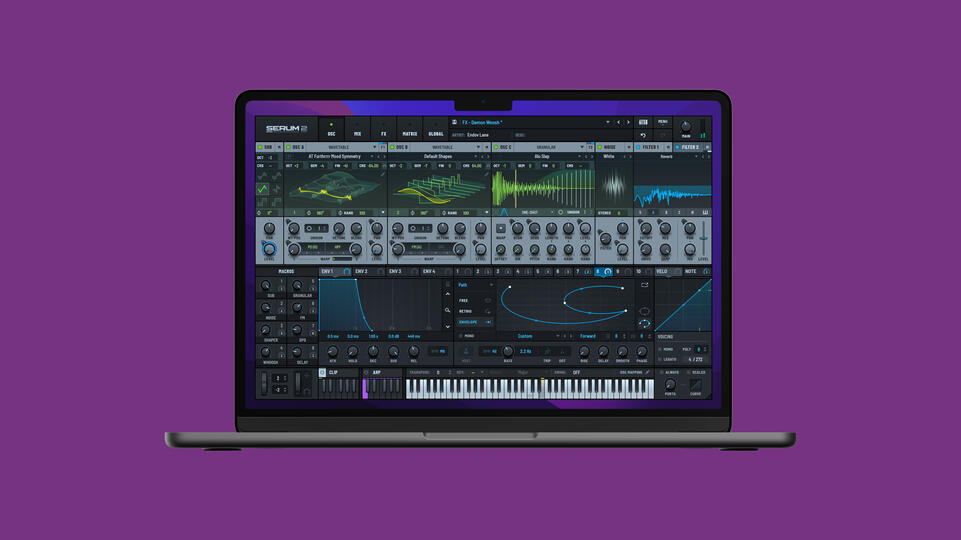
Serum 2 by Xfer Records Review: The Ultimate Wavetable Synthesizer for Music Producers in 2025
My copy of Serum 1 had probably been open in every single project I made between 2016 and 2024. Not because I consciously chose it each time — just because it was already there in the template. The supersaws on the B section, the reese bass an octave down, the modulated filter sweep tied to the drop. I knew exactly where every knob lived. Muscle memory, basically.
So when Steve Duda dropped Serum 2 in March 2025 — for free, to anyone who already owned version one — my first reaction was suspicion more than excitement. Free major updates don’t happen. When they do, they’re usually minor. I opened the changelog and spent about twenty minutes just reading it before I downloaded anything.
The changelog was not minor.
🎛️ Five Oscillators Now. Five.
The original Serum had two wavetable oscillators, a sub, and a noise source. Clean, focused, did what it needed to do. Serum 2 keeps all of that and adds a granular engine, a spectral engine, and a proper multi-sampler — each one running as its own independent oscillator with its own mixer channel. You can use all five at once. Most patches I’ve built since the update use three or four of them layered together, which is something I literally couldn’t do before without opening a second instance and routing audio between plugins.
The granular oscillator is the one I keep coming back to. You load audio — anything, really, I’ve used field recordings, old vocal takes, a single piano note sustained for eight seconds — and it chops it into grains. Grain size, position scrubbing, spray amount, pitch randomization, playback speed: all of it modulatable in real time. At small grain sizes with high spray you get this shimmering, almost harmonic texture that no wavetable produces. It breathes in a way that feels organic rather than designed. Crank the pitch randomization past about 40% and things start falling apart beautifully — which is sometimes exactly what a pad needs.
The spectral oscillator is weirder. It works in FFT space — you import audio or wavetables and Serum converts them into a spectral representation you can warp, filter by harmonic content, and morph between. There’s a feature where you can import a PNG image and the plugin reads the pixel brightness as harmonic amplitude data. I used a photo of a forest for a project last month. It made a sound I would never have arrived at any other way, and that alone tells you something about where this engine sits relative to anything else in the same price bracket.
The multi-sampler is probably the most practically useful addition for producers who work across genres. Load SFZ files — multi-velocity orchestral samples, keyboard-mapped drum hits, whatever — and play them as an oscillator that responds to pitch and velocity exactly like a hardware sampler would. You can then layer it with a wavetable oscillator, run them through separate filters, and have the sampled element rooted in reality while the wavetable component floats above it. Hybrid sounds that used to require Kontakt and Serum open at the same time are now a single patch.
🎚️ The Mixer Tab Fixes the One Thing I Always Complained About
In Serum 1, every oscillator fed the same filter and the same effects chain. You could do some routing tricks with the noise oscillator, run two instances and sidechain between them, but anything more complex than that and you were fighting the architecture. Serum 2 adds a full mixer tab: individual channels per oscillator, filter bus routing, an effects bus, master output. The wavetable layer can go into Filter A with drive cranked up while the granular pad feeds Filter B with a gentle low-pass, then both merge into a shared reverb send. This took about five minutes to understand and I haven’t thought about running two Serum instances since.
🔉 On the Effects: Convolution Reverb Changes Things
Eleven new filter types arrived with the update, including some analog-modeled shapes that have a bit of weight to them rather than the purely neutral character of the original filters. Worth exploring but not the headline.
The convolution reverb is the headline. You can load your own impulse responses — I’ve been using IRs from a church hall I recorded myself, and a couple of spring reverb captures from a hardware unit I don’t own anymore. Drop them into the patch and they become part of the sound design itself, not an afterthought applied at the channel strip. The reverb tail is baked into the synthesis, which changes how you write automation for it, how the sound evolves over time, and how it sits in a mix. It’s a different compositional approach, and once you’ve worked that way it’s hard to go back to treating reverb as a send effect on a synth track.
Parallel effects routing is new too. Wet and dry can flow through completely separate bus paths rather than being blended at the end of a single chain. Practically speaking this means you can keep the dry signal totally clean and only process the wet layer heavily — useful for any technique where you want extreme effects on just part of the sound.
🎹 The CLIP Module and New LFOs
The CLIP module is a 12-slot pattern sequencer living inside the plugin itself — piano roll editor, velocity per step, sync to DAW BPM, MIDI file import. You trigger different patterns by playing different MIDI notes, which means you can map patterns to a controller and switch between them mid-performance. For studio use, it mostly means I stop bouncing melodic sketches out to MIDI clips and just leave them inside the patch. Less project clutter, faster recall.
The LFO section got Path mode, which lets you draw a curve on an XY grid rather than choosing from preset shapes. Lorenz and Rossler chaos modes generate motion that’s mathematically structured but non-repeating in a musical way — unlike random, which tends to sound jittery. Macros doubled from four to eight. I haven’t found myself needing all eight yet, but for anyone building patches for Splice or selling presets commercially, having more mapped parameters per patch is meaningful.
🎙️ How It Sits in a Real Workflow: Genre Notes
I primarily work in melodic techno and dark ambient, so the granular and spectral engines immediately had obvious applications for me. But I’ve been talking to producers in other genres since the update dropped and the picture is consistent across the board.
Hip-hop and trap producers are getting a lot out of the multi-sampler oscillator layered under a wavetable lead — the sampled element adds warmth and rootedness that pure synthesis rarely has, and you can automate the crossfade between them. House and techno people are using the new analog-modeled filters with the classic wavetable engines and finding the character they always wanted from Serum without routing into a separate saturation plugin. Film and TV composers who’ve been keeping Serum around for design work are treating the granular engine as a proper replacement for standalone granular instruments that cost $150 on their own.
If you’re comparing Serum 2 to something like Vital at its free tier: Vital is genuinely impressive for what it costs, but the multi-engine architecture, the CLIP module, and the convolution reverb put Serum 2 in a different conversation. At $249 against Massive X at around $200, Serum 2 has more synthesis types and a more transparent workflow. The choice comes down to whether you want Massive X’s modulation depth or Serum 2’s breadth of engine options.
⚠️ CPU: Be Realistic About Your Hardware
Running a five-oscillator patch with 8-voice unison on each engine, convolution reverb, parallel effects, and Lorenz LFOs on three parameters simultaneously will spike your CPU meter. On my M2 MacBook Pro this isn’t a problem in normal use. On an i7 from 2019 and a Ryzen 5000 series machine I tested it on, complex patches needed freezing before the session got to 30 tracks. The quality dial inside the plugin drops CPU significantly — medium quality is honestly indistinguishable from high in a full mix. The workaround exists, but the expectation needs setting upfront: this is not a lightweight plugin when used at its ceiling.
🔧 Quick Specs
| Price | $249 — free upgrade for Serum 1 owners |
| Formats | VST3, AU, AAX — 64-bit only |
| Platforms | macOS (High Sierra+ Intel / Big Sur+ Apple Silicon) | Windows 10/11 |
| Oscillators | Wavetable, Granular, Spectral, Multi-Sampler, Sub |
| Unison | Up to 16 voices per oscillator engine |
| Presets / Wavetables | 626+ / 288+ |
| Sequencer | 12-slot CLIP module, piano roll, MIDI import |
| LFO modes | Path, Lorenz, Rossler, Sample & Hold (new) |
| Demo | Available, 15-minute limit per session |
🏆 Worth It?
If you own Serum 1, download the update today. There’s genuinely no reason not to — it installs alongside the original, your patches all load, and the new engines are just there waiting. You don’t have to use all five oscillators in every patch. You can keep making Serum 1 sounds with Serum 2 and just dip into the new stuff when you feel like it.
For anyone buying fresh at $249: the multi-engine architecture alone puts this in a different category from standalone wavetable synths at the same price. You’re not buying Serum with extras. You’re buying something that covers Serum, a granular instrument, a spectral synthesizer, and a multi-sampler in one interface. Whether you use all of that or just the wavetable engine with better filters, the headroom is there.
🔗 Try or buy Serum 2: xferrecords.com/products/serum-2 — free 15-minute demo available. Also available rent-to-own via Splice.
📺 Also on vstor.me: FabFilter Pro-Q 4 Review — The Gold Standard EQ Plugin
⭐⭐⭐⭐⭐ 5/5
📖 As featured in The Best VST Plugins for Music Production in 2026 — Revolution 93.5
