



Overview
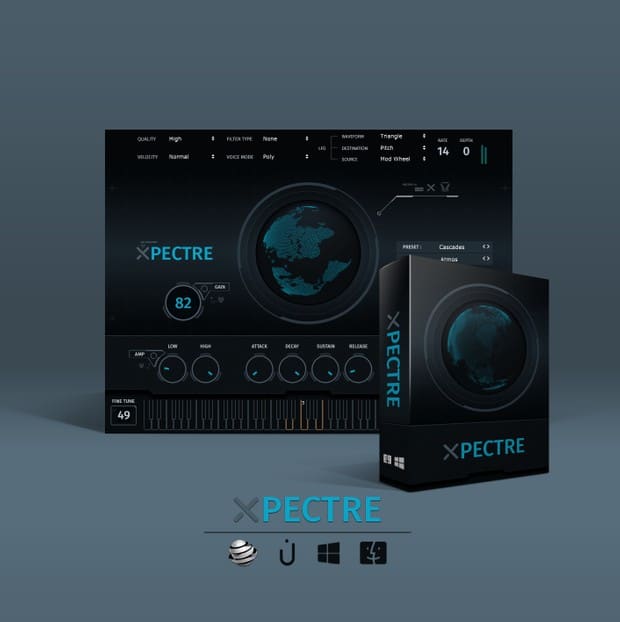
If you produce chill trap, urban beats, or electronic music and need a versatile collection of sounds that spark inspiration, Xpectre VST is designed for you. This plugin packs over 185 professionally crafted instruments into one intuitive virtual instrument. From atmospheric pads and deep bass to catchy leads and plucks, every sound is tailored for modern genres like trap, EDM, hip‑hop, and lo‑fi.
What makes Xpectre VST stand out is its balance of breadth and usability. Instead of offering a handful of presets, it gives you a full palette of 15 atmospheric layers, 20 bass patches, 10 bell tones, 3 choir textures, 20 keys, 19 leads, 16 miscellaneous sounds, 20 pads, 15 plucks, 16 strings, 19 synth voices, and 12 textures. That’s enough variety to sketch an entire track without leaving the plugin.
Key Features
- 185+ Ready‑to‑Use Instruments: A curated library covering atmos, bass, keys, plucks, synths, pads, strings, bells, choirs, and textures—all royalty‑free.
- Intuitive On‑Board Effects: Shape each sound with ADSR envelopes, reverb, LFO modulation, glide, low/high amp filters, panning, volume, and pitch controls.
- Genre‑Focused Design: Every preset is built with chill trap, urban, and electronic production in mind, so you spend less time searching and more time creating.
- Clean, User‑Friendly Interface: A sleek, uncluttered layout lets you tweak parameters quickly, even if you’re new to sound design.
- Cross‑Platform Compatibility: Works on Windows (64‑bit) and macOS, supporting most major DAWs as a standard VST plugin.
Why Choose Xpectre VST?
Many synth plugins overwhelm you with thousands of presets that don’t fit your style. Xpectre VST takes a different approach: it focuses on the sounds that actually work in today’s chill trap, urban, and electronic scenes. The selection is deep enough to keep you inspired, yet focused enough that you won’t get lost in menus.
The built‑in effects are another practical advantage. You can add reverb, adjust the filter, set up glide, or modulate parameters right inside the plugin—no need to load extra effect chains. This streamlined workflow lets you sculpt the perfect tone without breaking your creative flow.
Because all sounds are 100% royalty‑free, you can use them in commercial releases without worrying about licensing fees. Whether you’re producing for yourself, for clients, or for sync placements, Xpectre VST gives you the legal peace of mind to create freely.
Technical Details
Xpectre VST is delivered as a complete offline installer. After purchase, you download the package (approx. 15 GB) and run the setup. No online activation or subscription is required.
What’s Included
- Full standalone installer for Windows 64‑bit and macOS
- VST plugin format (compatible with VST‑hosts like FL Studio, Ableton Live, Logic, etc.)
- License for personal use on one computer
- Lifetime updates for the purchased version
- Direct download link after payment
Sound Categories Breakdown:
15 Atmos | 20 Bass | 10 Bells | 3 Choirs | 20 Keys | 19 Leads | 16 Misc | 20 Pads | 15 Plucks | 16 Strings | 19 Synths | 12 Textures
System Requirements:
Windows: Vista, 7, 8, 8.1, 10 (64‑bit recommended)
macOS: 10.7 (Lion) through macOS Mojave
Disk Space: Approximately 15 GB free space required
DAW Compatibility: FL Studio, Ableton Live, Cubase, Reason, Reaper, Maschine, and other VST‑hosts.
Frequently Asked Questions
How much disk space does Xpectre VST need?
Approximately 15 GB of free space is required for the full installation. Make sure you have enough room on your drive before downloading.
Are the sounds royalty‑free?
Yes, all 185+ instruments are 100% royalty‑free. You can use them in your commercial music without any additional fees.
Does it work on 32‑bit systems?
The plugin is optimized for 64‑bit Windows and macOS. 32‑bit support is not guaranteed, so we recommend using a 64‑bit DAW for best performance.
Can I use it on multiple computers?
The license covers one computer at a time. If you need to move it to a new machine, you can deactivate the previous installation.
What genres is Xpectre VST best for?
It’s designed for chill trap, urban, hip‑hop, EDM, lo‑fi, and electronic music, but the sounds are versatile enough for many other styles.
Ready to Expand Your Sound Library?
Xpectre VST is a practical solution for producers who want a broad selection of modern, usable sounds without sifting through thousands of irrelevant presets. Its focused design means you’ll find inspiring instruments quickly, and the built‑in effects let you shape them to fit your track exactly.
If you’re tired of scrolling through generic synth libraries and need a plugin that delivers chill trap and urban textures right out of the box, give Xpectre VST a listen. The demo video above shows how the sounds sit in a mix—notice the clarity and depth even on smaller speakers.
Get Xpectre VST Now
185+ royalty‑free instruments • One‑time purchase • Lifetime updates
Secure checkout • Instant download • 30‑day satisfaction guarantee
Explore Other Essential Production Tools
If you’re looking for dedicated sub‑bass and 808 sounds, check out SUBSTATION PRO VST. For a versatile multi‑effects processor that can polish any track, take a look at Studio Rack. To learn more about the original Xpectre VST, visit the developer’s official page.
Be the first to review “Xpectre VST – Chill Trap & Urban Synth Plugin with 185+ Sounds”
You must be logged in to post a review.
Related products
VST Instruments
VST Instruments
VST Instruments
VST Instruments
VST Instruments
VST Instruments
VST Instruments

VST Instruments
Reviews
There are no reviews yet.