

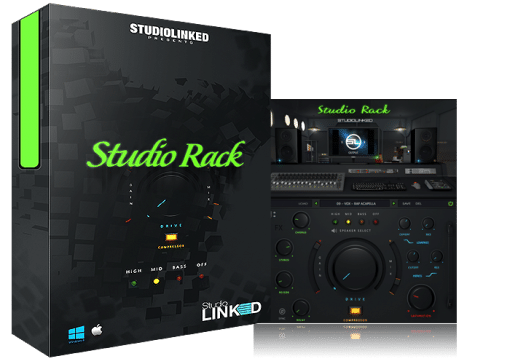


When you’re mixing vocals, 808s, drums, or entire tracks, you often need several effects to add polish and depth. Studio Rack Multi‑FX combines those essential processors into one streamlined plugin. Created by Studiolinked, it packs speaker emulation, reverb, delay, chorus, filtering, compression, and gain staging into a single interface—so you can shape and enhance sounds without loading a chain of separate effects.
Whether you produce hip‑hop, R&B, pop, rock, EDM, or country, Studio Rack gives you a quick way to add professional sheen to any element. Place it on a vocal to add air and dimension, on an 808 sub to tighten the low end, on drums to add space and punch, or on your master bus to glue the mix together. The plugin is built for speed and musical results, not complicated sound design.
Key Features
- Three‑Band Speaker Emulation: Hi, mid, and bass speaker models that add subtle coloration and warmth, mimicking real studio monitors.
- Essential Effects Suite: Delay, reverb, stereo widening, chorus, and high‑/low‑pass filters to create space and movement.
- Fixed Compressor & Gain Stage: A calibrated compressor and gain control that levels your signal without overwhelming settings.
- Mix Slider: Blend the processed signal with the dry signal for parallel processing—great for adding just a touch of effect.
- Broad Compatibility: Works as a VST in FL Studio, Ableton Live, Cubase, Reason, Reaper, Maschine, and other major DAWs (AAX not supported).
Why Choose Studio Rack Multi‑FX?
Most producers end up stacking three or four different plugins to get the sound they want. Studio Rack Multi‑FX condenses that workflow into a single window. Instead of tweaking multiple knobs across separate devices, you adjust a focused set of parameters that work together musically. This speeds up your mixing process and keeps you in a creative headspace.
The speaker emulation is a standout feature. By simulating hi, mid, and bass speaker characteristics, it can make tracks feel like they’re playing through real monitors—adding a subtle, pleasing coloration that pure digital effects often miss. Combine that with the reverb, delay, and chorus, and you can quickly add depth and dimension to otherwise flat sounds.
Because it includes a fixed compressor and gain stage, you also get gentle level control without having to dial in complicated compression settings. The mix slider lets you blend the effect smoothly, which is perfect for parallel processing on drums or vocals. In short, Studio Rack is a practical, time‑saving tool for producers who want professional polish without the complexity.
Technical Details
Studio Rack Multi‑FX is delivered as a complete offline installer. After purchase, you download the file and run the setup. No online activation or subscription is required.
What’s Included
- Full standalone installer for Windows and macOS
- VST plugin format (compatible with VST‑hosts)
- License for personal use on one computer
- Lifetime updates for the purchased version
- Direct download link after payment
Effects Breakdown:
Speaker Emulation: Hi, Mid, Bass models
Modulation & Space: Delay, Reverb, Stereo, Chorus
Filtering: High‑pass and low‑pass filters
Dynamics: Fixed compressor, gain stage, mix slider
System Requirements:
Windows: Vista, 7, 8, 8.1, 10 (32‑bit or 64‑bit)
macOS: 10.7 (Lion) through macOS Mojave
DAW Compatibility: FL Studio, Ableton Live, Cubase, Reason, Reaper, Maschine, and other VST‑hosts.
Note: AAX format for Pro Tools is not supported; you can use a wrapper like Bluecat Patchwork to run it inside Pro Tools.
Frequently Asked Questions
What is speaker emulation?
Speaker emulation mimics the sonic character of real studio monitors. Studio Rack includes three bands (hi, mid, bass) that add subtle warmth and coloration, helping tracks sound more like they’re playing through physical speakers.
Can I use Studio Rack on the master bus?
Yes, many producers place it on the master bus to add gentle glue, stereo width, and a finished sheen. Use the mix slider to blend in just the right amount of processing.
Does it work with Pro Tools?
Studio Rack is a VST plugin, so it doesn’t natively support Pro Tools’ AAX format. However, you can use a VST‑to‑AAX wrapper like Bluecat Patchwork to run it inside Pro Tools.
Is the compressor adjustable?
The compressor is fixed—it’s designed to provide gentle leveling without complicated settings. This makes it easy to use, especially if you’re new to compression.
What genres is Studio Rack best for?
It works well for hip‑hop, R&B, pop, rock, EDM, country, and virtually any genre that needs polishing. The effects are musical and generic enough to suit many styles.
Ready to Polish Your Tracks Quickly?
Studio Rack Multi‑FX is a straightforward solution for producers who want an all‑in‑one processing tool. Instead of hunting for the right reverb, then the right delay, then a compressor, you get a curated set of effects that work together from the start. That means less time tweaking and more time making music.
If you’re tired of building complex effect chains and want a plugin that adds professional polish with a few simple adjustments, give Studio Rack a try. It’s especially helpful when you need to quickly enhance vocals, tighten low‑end, add space to drums, or give your mix a finished feel.
Explore Other Essential Production Tools
If you’re looking for a dedicated 808 and sub‑bass plugin, check out SUBSTATION PRO VST. For a broad collection of chill trap and urban synth sounds, take a look at Xpectre VST. To learn more about the original Studio Rack plugin, visit the developer’s official page.
Be the first to review “Studio Rack Multi‑FX Plugin – Vocal & Mix Processing Tool”
You must be logged in to post a review.
Related products
VST Plug-ins
VST Plug-ins
VST Plug-ins
VST Instruments
VST Plug-ins

Sound Loops & Samples
StudioLinked – Modernize VST + Festival Trap, EDM Trap EXPANSIONS
VST Plug-ins
Reviews
There are no reviews yet.