

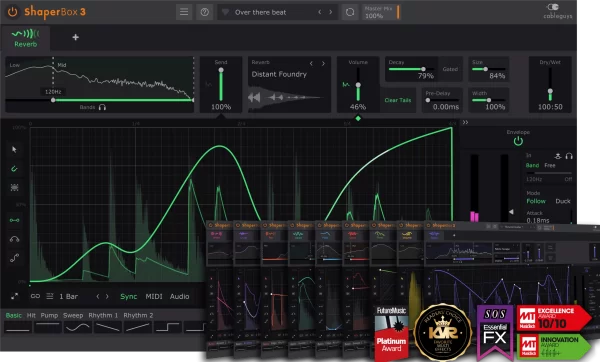
Cableguys ShaperBox 3 VST Plugin


Original price was: $99.00.$40.00Current price is: $40.00.
Ten dedicated shaper effects in one plugin: VolumeShaper, TimeShaper, FilterShaper, PanShaper, WidthShaper, DriveShaper, PitchShaper, CrushShaper, ReverbShaper, and FazeShaper. Drawable LFO waveforms, envelope followers, audio triggering. VST2, VST3, AU, AAX for macOS and Windows.
Cableguys ShaperBox 3 VST Plugin PC & MAC
Most effect plugins apply a fixed process to your audio. Cableguys ShaperBox 3 flips that idea on its head. Instead of choosing a preset and tweaking a few knobs, you draw exactly how each parameter moves over time. Want a filter that opens in a rhythmic pattern? Draw the shape. Need a volume gate that follows your drum pattern? Draw it. With ten dedicated shapers in one plugin, ShaperBox 3 turns motion into a fundamental part of your sound design.
The plugin works by linking LFO waveforms, envelope followers, or audio triggers to parameters like volume, filter cutoff, pitch, pan, width, drive, reverb, and more. Because the movement syncs to your DAW’s tempo, effects feel locked to the groove rather than simply layered on top. It’s a different way of thinking about processing—one that encourages experimentation and delivers results that stand out.
Cableguys ShaperBox 3 — 10 Shaper Effects
ShaperBox 3 bundles ten distinct effects, each focusing on a specific type of modulation. You can run multiple shapers in parallel, chain them, or use just the ones you need. Below is a breakdown of what each shaper does.
10 Included Shapers
- VolumeShaper – Rhythmic volume modulation, gating, and tremolo. Shape the amplitude envelope of any sound.
- TimeShaper – Tape‑stop effects, stutter, and reverse. Manipulate playback speed and direction in time with the beat.
- FilterShaper – Vintage and modern filter modulation. Sweep cutoff and resonance with drawn curves.
- PanShaper – Stereo panning automation and auto‑pan. Move sounds around the stereo field rhythmically.
- WidthShaper – Stereo width modulation. Widen or narrow the stereo image over time.
- DriveShaper – Rhythmic saturation and harmonic drive. Add grit and warmth that pulses with the track.
- PitchShaper – Pitch modulation and vibrato. Create tuned pitch wobs and rhythmic detuning.
- CrushShaper – Bit‑crushing and sample‑rate reduction. Degrade audio in time with the rhythm.
- ReverbShaper – Modulated and immersive reverb effects. Shape decay and density over time.
- FazeShaper – Phaser and flanger modulation. Draw the movement of the modulation rate.
Why ShaperBox 3 Changes Your Workflow
Traditional LFOs offer basic shapes—sine, triangle, square. ShaperBox 3 lets you draw any shape you can imagine. That means you can create patterns that evolve in complex ways, match the rhythm of your track, or respond to the dynamics of the input signal via the envelope follower.
Moreover, the audio‑triggering mode is particularly powerful. Sidechain a shaper to a drum bus, and every kick or snare hit can trigger a filter sweep, a volume pulse, or a pitch drop. It’s an easy way to make elements of your mix interact, adding cohesion and energy.
Because all ten shapers live in one plugin, you can modulate multiple parameters at once without loading multiple instances. That keeps your CPU load low and your creative flow fast. The interface is intuitive: draw your shape, adjust the rate and depth, and hear the change immediately.
Ready to add movement that grooves with your track?
Get Cableguys ShaperBox 3 and start drawing your own modulation shapes today.
System Requirements & Compatibility
Windows: Windows 7, 8, 10, or 11 – 64‑bit. VST2, VST3, AAX. You need an internet connection during initial setup to download noise samples and reverb impulse responses.
Mac: macOS 10.13 or later, Intel or Apple Silicon. VST2, VST3, AU, AAX. The same requirement applies for first‑time setup on Mac.
ShaperBox 3 works in Ableton Live, Logic Pro, Pro Tools 12+, Cubase, Bitwig Studio, FL Studio, Reaper, Studio One, and any other DAW that supports VST, AU, or AAX formats.
For more information, visit the official Cableguys ShaperBox page. You can also explore our full range of VST effects plugins for other creative processing tools.
Frequently Asked Questions
What’s the difference between ShaperBox 2 and ShaperBox 3?
ShaperBox 3 adds the ReverbShaper and FazeShaper (phaser/flanger) as new effects not present in ShaperBox 2, bringing the total to 10 shapers. Version 3 also introduces audio triggering, an improved browser with a larger preset library, and an updated interface. Presets from ShaperBox 2 are compatible with version 3.
Can ShaperBox 3 be synced to DAW tempo?
Yes. All LFO waveforms in ShaperBox sync to your DAW’s BPM by default. You can set the LFO rate in musical values (1/4, 1/8, 1/16, etc.) or switch to free-running Hz mode for effects not locked to tempo. The envelope follower and audio triggering modes react to incoming audio rather than tempo.
Does ShaperBox 3 require an internet connection after installation?
An internet connection is required to download the noise samples and reverb impulse response files used by CrushShaper and ReverbShaper during initial setup. After that, the plugin runs fully offline.
What DAWs does Cableguys ShaperBox 3 support?
ShaperBox 3 supports VST2, VST3, AU, and AAX formats. It works in Ableton Live, Logic Pro, Pro Tools 12+, FL Studio, Cubase, Bitwig Studio, Reaper, Studio One, and any other 64-bit DAW on Mac or Windows that accepts those formats.
Be the first to review “Cableguys ShaperBox 3 VST Plugin”
You must be logged in to post a review.
Related products
VST Plug-ins
VST Plug-ins
VST Plug-ins
Bundle Deals
VST Instruments
VST Plug-ins
VST Instruments
VST Plug-ins
Reviews
There are no reviews yet.