

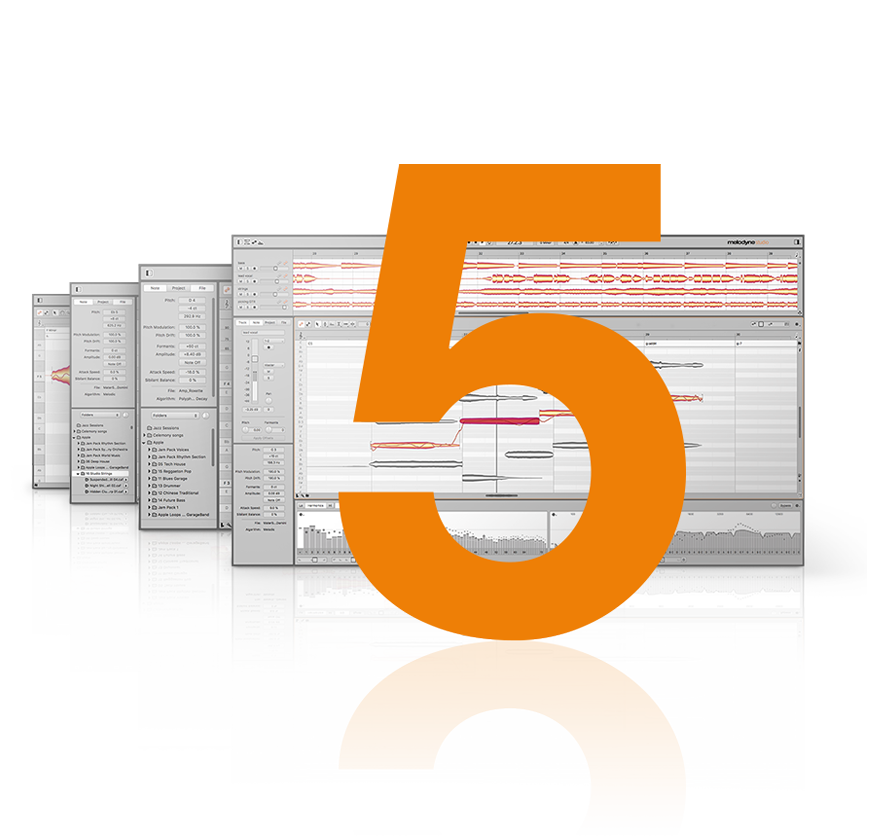


Celemony Melodyne 5 Studio: Professional Pitch & Time Editing
When you need precise control over vocals and instrumental recordings, Melodyne 5 Studio from Celemony offers the tools to edit pitch, timing, and tone with a natural feel. Used by top producers, engineers, and artists, Melodyne analyzes your audio and lets you adjust individual notes as if they were MIDI data—without the robotic artifacts of traditional pitch‑correction.
Whether you’re tuning a vocal performance, fixing timing issues in a guitar part, or reshaping the harmonics of a synth line, Melodyne 5 Studio provides the accuracy and flexibility you need. It works as a standalone editor or integrates directly into your DAW via ARA, keeping your workflow smooth and uninterrupted.
What You Get With Melodyne 5 Studio
- ✅ Melodyne 5 Studio application – standalone editor and plug‑in (VST3, AU, AAX)
- ✅ ARA integration – seamless editing in compatible DAWs (Studio One, Logic, Cubase, etc.)
- ✅ Surround sound support – edit multi‑channel audio in ARA and Transfer modes
- ✅ Free updates to version 5.3 – includes all bug fixes and improvements
- ✅ Lifetime activation – use on one computer at a time (Windows or macOS)
Why Engineers Choose Melodyne for Critical Editing
Melodyne’s unique DNA (Direct Note Access) technology detects the individual notes in polyphonic material, letting you change chords, adjust intonation, and even alter the timing of specific notes within a complex recording. This goes far beyond simple vocal tuning—you can edit pianos, guitars, strings, and more with the same intuitive tools.
The interface presents notes as blobs on a piano roll, so you can drag them up or down to change pitch, slide them left or right to adjust timing, or tweak formants and vibrato with dedicated tools. The result sounds natural because Melodyne preserves the original character of the performance while correcting the issues you choose to fix.
Get Melodyne 5 Studio at an Affordable Price
Purchase your license now and download Melodyne 5 Studio directly from Celemony.
Key Features That Make Melodyne 5 Studio Stand Out
Polyphonic & Monophonic Editing
Edit chords and individual notes in polyphonic material (piano, guitar, strings) as easily as monophonic sources (vocals, wind instruments). Change pitches, timing, and harmonics note by note.
ARA & Transfer Modes
Use ARA for seamless, sample‑accurate editing inside compatible DAWs, or the Transfer plug‑in to send audio to the standalone editor and back.
Pitch & Time Tools
Pitch‑Correct macro for quick tuning, Pitch Modulation for vibrato editing, Timing tool for adjusting note positions, and Formant tool for shifting vocal character without affecting pitch.
Surround Sound Support
Edit multi‑channel surround tracks (5.1, 7.1, etc.) in both ARA and Transfer modes, making Melodyne suitable for film and broadcast post‑production.
Detailed Specifications
- Supported Platforms: Windows 10/11, macOS 10.13 or later (including Apple Silicon)
- DAW Compatibility: Works as VST3, AU, AAX plug‑in; ARA support for Studio One, Logic, Cubase, Reaper, etc.
- ARA Integration: Sample‑accurate editing inside the DAW timeline, no round‑tripping needed
- Surround Formats: 5.1, 7.1, and other standard surround layouts
- Key Improvements in 5.3: Surround support, ARA for Pro Tools 2022.9+, DAW‑specific keyboard shortcuts, bug fixes
- Note Inspector: Detailed controls for pitch, timing, formants, sibilant balance, and more
- Macros: Pitch‑Correct, Quantize Timing, etc. for fast batch processing
Frequently Asked Questions
Who Should Use Melodyne 5 Studio?
Melodyne 5 Studio suits anyone who needs detailed audio editing:
- Vocal Producers & Engineers – tune vocals naturally, adjust phrasing, and balance sibilants.
- Songwriters & Composers – fix timing and pitch issues in instrumental recordings without re‑tracking.
- Film & TV Composers – edit surround audio stems and match vocals to picture.
- Podcast & Voice‑Over Editors – clean up dialogue, reduce mouth noises, and improve clarity.
- Educators – demonstrate pitch and timing concepts with visual feedback.
If you’ve used other pitch‑correction tools like Auto‑Tune or Waves Tune, you’ll find Melodyne’s approach more musical and less intrusive. It’s an editor that respects the original performance while giving you the control to perfect it.
Add Melodyne 5 Studio to Your Editing Toolkit
Join the producers who rely on Melodyne for precise, natural‑sounding edits. Click below to purchase your license.
You’ll receive your download link and activation instructions within a few hours.
Final Thoughts
Melodyne 5 Studio remains the benchmark for pitch and time editing. Its ability to treat audio as flexible notes—rather than applying heavy‑handed processing—makes it indispensable for producers who care about preserving the feel of a performance.
Whether you’re tuning a lead vocal, fixing a bass guitar timing issue, or editing a surround sound mix, Melodyne 5 Studio provides the tools to do it with precision and musicality. The latest version adds surround support and improved ARA integration, ensuring it stays relevant in modern production environments.
Ready to experience Melodyne’s editing power? Visit Celemony’s official website for video tutorials, or browse more audio‑editing tools in our store.
Be the first to review “Celemony Melodyne 5 Studio VST PC & MacOS”
You must be logged in to post a review.
Related products
VST Plug-ins

VST Plug-ins
VST Plug-ins

Sound Loops & Samples
StudioLinked – Modernize VST + Festival Trap, EDM Trap EXPANSIONS
VST Plug-ins

VST Plug-ins

VST Instruments
VST Plug-ins
Reviews
There are no reviews yet.