


Overview
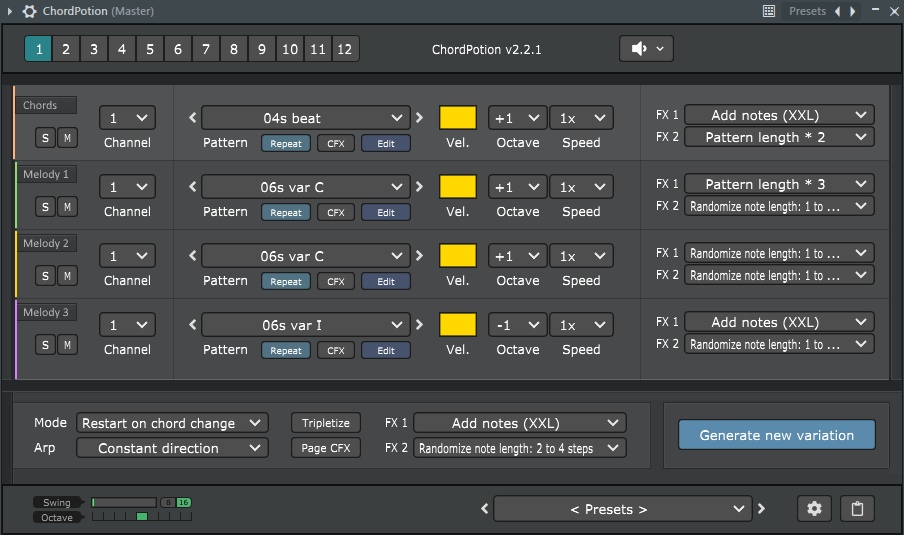
FeelYourSound ChordPotion VST is a plugin that helps you turn simple chord progressions into professional melodic phrases in seconds. If you ever get stuck writing leads, arpeggios, or rhythmic patterns, ChordPotion listens to the chords you play and generates moving, musical ideas you can use right away. It’s not a synth – it’s a MIDI sequencer and effect that works with any instrument in your DAW. Load it on a track, play a chord, and watch it come to life.
How ChordPotion Works in Your Workflow
- Load the plugin on a MIDI track in your DAW (VST or AU format).
- Route it to your favorite synthesizer or use the built‑in piano sound for quick previews.
- Play a chord – any chord you like – in your DAW’s piano roll or via a MIDI keyboard.
- Choose a playing style from the library of presets (arpeggios, rhythms, melodies, etc.).
- Mix and match patterns, adjust timing and velocity, and export the result as standard MIDI to refine further.
The whole process takes less than a minute, and you end up with a melodic phrase that feels human‑played, not robotic. It’s a quick way to break out of creative blocks or to add polished ear‑candy to your arrangements.
What You Can Do with ChordPotion
- ✅ Create instant arpeggios – from simple up‑down patterns to complex rhythmic sequences
- ✅ Generate melodic hooks – turn a static chord into a moving lead line
- ✅ Add rhythmic interest – inject groove and motion into pad or chord tracks
- ✅ Experiment with harmony – try different chord voicings and see how the phrases change
- ✅ Export MIDI for further editing – every pattern can be saved as a standard MIDI file for fine‑tuning in your DAW
Key Features That Make ChordPotion Useful
- Drag‑and‑Drop Pattern Building – Combine different “ingredients” (rhythm, melody, articulation) by dragging them into the mixer. It feels more like cooking than programming.
- Large Preset Library – Dozens of included playing styles cover genres like house, techno, pop, cinematic, and hip‑hop. You can also download expansion packs from FeelYourSound.
- Built‑In Sound Module – A simple piano sound lets you preview phrases without loading another synth. Once you like the pattern, route ChordPotion to your preferred instrument.
- DAW‑Wide Compatibility – Works as VST, AU, or AAX in Ableton Live, FL Studio, Logic Pro, Cubase, Studio One, Bitwig, and most other hosts.
- Non‑Destructive Workflow – Your original chords stay untouched. ChordPotion generates new MIDI data that you can edit, duplicate, or delete independently.
Why Producers Keep ChordPotion in Their Toolkit
- It Saves Time – Instead of manually drawing notes for arpeggios or leads, you get a musical starting point in seconds.
- It Sparks Ideas – Even if you don’t use the generated phrase as‑is, it can suggest a rhythmic or melodic direction you hadn’t considered.
- It’s Easy to Learn – The interface is visual and intuitive. You don’t need to read a manual to get results, though detailed tutorials are available on the FeelYourSound site.
- It Works with Any Sound – Because it outputs MIDI, you can use it with any virtual instrument – from massive synth pads to acoustic guitar libraries.
Add ChordPotion VST to Your Cart
Turn chords into melodies instantly. Click below to purchase your license and download immediately.
Download links are sent automatically after payment.
Frequently Asked Questions
Technical Details
- Plugin Format: VST, AU (64‑bit)
- Platform: Windows 10/11, macOS 10.12 or later
- DAW Compatibility: Ableton Live, FL Studio, Logic Pro, Cubase, Studio One, Bitwig, Reaper, etc.
- MIDI Export: Standard .mid files
- Presets: 50+ included playing styles, expandable via packs
- License: Single‑user, non‑transferable
- Delivery: Digital download after purchase
If you often find yourself repeating the same arpeggio patterns or wishing your chord tracks had more motion, ChordPotion VST can inject freshness into your workflow. It’s like having a collaborator who suggests melodic ideas while you focus on the bigger picture. Check out the video tutorials on the FeelYourSound site to see it in action, then grab your copy here.
Be the first to review “FeelYourSound ChordPotion VST – MIDI Sequencer Plugin”
You must be logged in to post a review.
Related products
Other VST Plugins
Trap & Hip Hop OMNISPHERE 19GB SOUND Collection & Over 35GB WAV Loops, Samples, Construction Kits

Other VST Plugins
Other VST Plugins
Reviews
There are no reviews yet.