

SSL Native Vocalstrip 2 & Drumstrip VST Bundle – Channel Strip & Drum Processing
Original price was: $199.00.$99.99Current price is: $99.99.
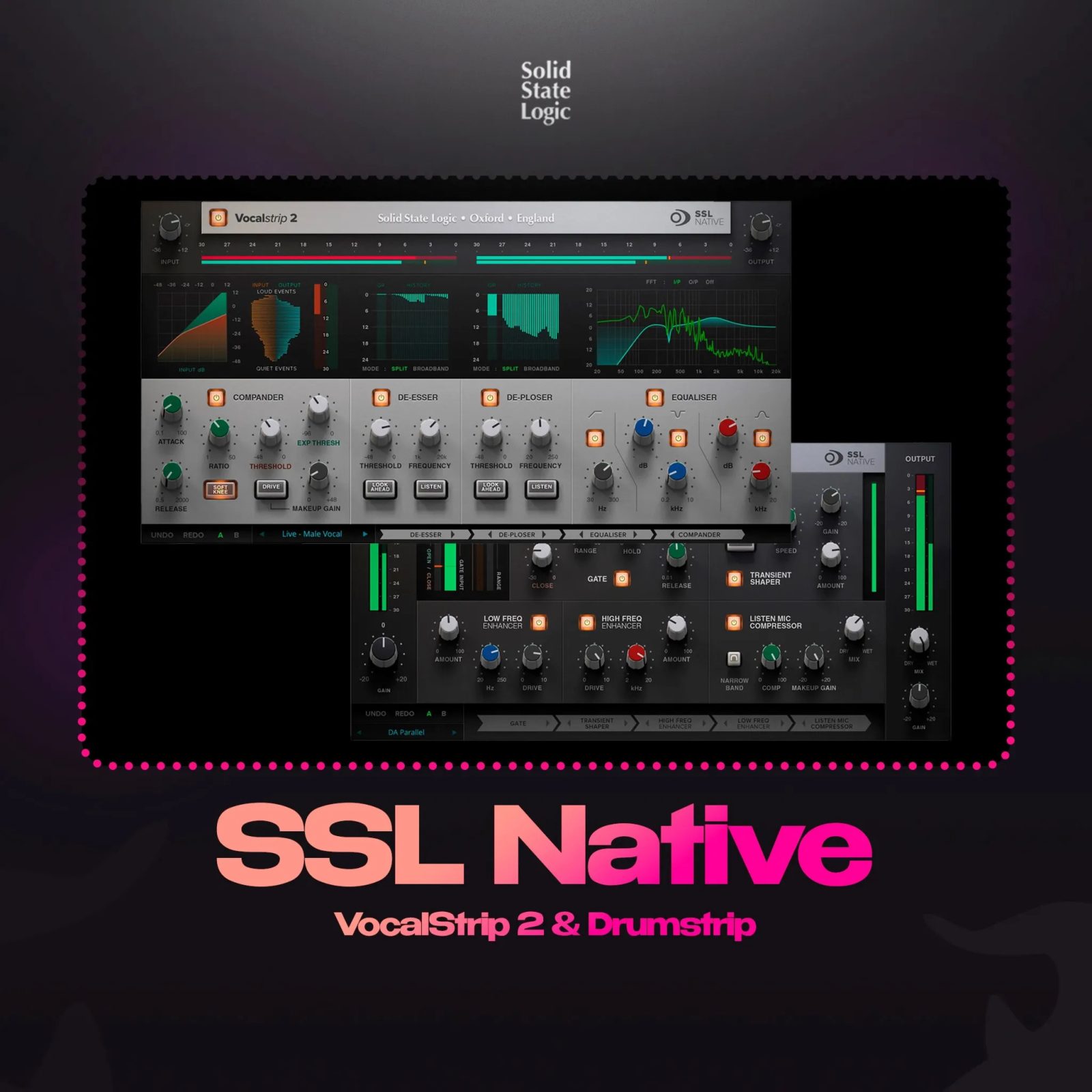
SSL Native Vocalstrip 2 & Drumstrip VST Bundle – console-grade EQ, compression, de-essing & drum transient shaping. Official SSL license, iLok activation.
Vocals that don’t sit in the mix. Drums that hit but lack definition. A mix that sounds good in headphones but falls apart on speakers. Every engineer knows these problems, and most reach for the same solution: Solid State Logic’s channel strip architecture — the same console technology that shaped decades of hit records. The SSL Native Vocalstrip 2 & Drumstrip VST Bundle brings two of SSL’s most refined processing tools into your DAW, giving you SSL-grade EQ, compression, de-essing, and transient shaping without the console-sized price tag.
As a result, this bundle delivers professional-grade channel processing for two of the most difficult elements in any mix. Vocalstrip 2 addresses the most critical channel — the human voice — with a combined four-band EQ, compressor, expander/gate, de-esser, and harmonic saturator designed around vocal workflow. Drumstrip, on the other hand, targets the specific demands of drum processing: transient punch, low-end weight, and stereo width control. Consequently, you get the same DSP algorithms SSL uses in their hardware consoles, applied to the sources that benefit most from console-grade processing.
What the SSL Native Vocalstrip 2 & Drumstrip Bundle Includes
This bundle delivers two distinct processors, each optimised for a specific source. Vocalstrip 2 is a complete channel strip for vocals, dialogue, and lead instruments. Drumstrip is a multi-tool for drums, percussion, and rhythmic elements. Both share SSL’s circuit-modeled character, but each applies it differently depending on the material.
SSL Native Vocalstrip 2 — Complete Vocal Processing in One Plugin
Vocalstrip 2 is an evolution of the original Vocalstrip, itself derived from SSL’s console channel processing. The plugin features a four-band EQ modeled after SSL’s G-Series console EQ, a compressor with auto-gain makeup, an expander/gate that works as both a noise gate and a downward expander, a de-esser with sidechain-aware detection, and a harmonic saturator based on SSL’s own console preamp stages.
What makes it different from loading five separate plugins on a vocal track is the processing order. SSL designed the signal flow so each stage interacts with the next the way it would in a hardware console. For example, the compressor responds to the EQ’s frequency shaping, and the de-esser sits after compression where it catches sibilance that might have been masked by softer compression settings. This integrated behaviour is something you cannot replicate by chaining individual plugins.
To understand how adaptive compression compares to standard designs, Sound On Sound’s guide to compression in mastering provides useful context on how different compressor topologies interact with dynamic material.
SSL Native Drumstrip — Transient Punch and Low-End Control
Drumstrip comprises four modules that address the most common drum mixing problems. Its Transient Shaper gives you independent control over attack and sustain — dial in more punch on a kick drum, or soften the attack on a snare that’s too aggressive. A dedicated Low-Frequency Compressor tightens low-end without clouding the mids. The Width Knob controls stereo image from mono to wide, making it useful for overheads and room mics. Finally, the Auto Pan module adds rhythmic movement that can follow your track’s tempo.
Use each module independently or in combination. On a kick and 808 bus, for instance, the Transient Shaper adds attack while the Low-Frequency Compressor keeps the sub-bass consistent across notes. Moreover, on a drum buss, the Width Knob spreads room mics before compression, giving you a stereo image that does not collapse when the compressor hits.
For producers building a complete mixing toolkit, Drumstrip pairs naturally with our VST plugins collection for additional processing options across different sources.
Who Should Use the SSL Native VST Bundle
Specifically, these plugins fit three distinct workflows. First, mixing engineers working with vocal-heavy genres — pop, R&B, hip-hop, gospel — will find Vocalstrip 2’s integrated chain saves significant setup time compared to routing multiple plugins. Second, electronic producers who process drums extensively benefit from Drumstrip’s ability to shape transients and control low-end in one interface. Third, engineers mixing hybrid ITB/analog setups can use these plugins to add SSL console character to individual tracks before summing.
Vocal Workflow with Vocalstrip 2
A typical vocal chain starts with the EQ: roll off subsonic rumble with the high-pass filter, address low-mid muddiness around 250–400 Hz, add presence at 5–8 kHz. From there, the compressor catches dynamic peaks with ratios from 2:1 to 10:1. The expander/gate handles background noise between phrases, and the de-esser targets sibilance above 6 kHz. Meanwhile, the harmonic saturator adds density that makes the vocal feel closer in the mix without raising its level.
For a more detailed look at vocal processing techniques that complement these tools, Sound On Sound’s vocal processing guide covers practical approaches to EQ, compression, and sibilance control.
Drum Workflow with Drumstrip
Apply the Transient Shaper to individual drum tracks first. Increase attack on kick drums for click and beater definition. Reduce sustain on snares that ring too long. Use the Low-Frequency Compressor on 808s and sub-bass elements to tighten the low end without losing weight. On drum busses, the Width Knob adds stereo spread to overheads before they hit a bus compressor, preserving width even under heavy compression.
SSL Native VST Bundle — Technical Specifications
⚙ Specifications
- • Plugin Formats: VST3, AU, AAX (64-bit)
- • OS: macOS 10.12+ (Intel & Apple Silicon native), Windows 10+ (64-bit)
- • Supported DAWs: Ableton Live, FL Studio, Logic Pro, Cubase, Studio One, Pro Tools, Reaper, Bitwig, Nuendo
- • Disk Space: 300 MB
- • RAM: 1 GB minimum (4 GB+ recommended)
- • Activation: iLok account required (physical dongle optional — machine-based authorization available)
What’s Included in the SSL Native VST Bundle
✅ What’s Included
- ✓ SSL Native Vocalstrip 2 — Full channel strip with EQ, compressor, gate, de-esser & saturator
- ✓ SSL Native Drumstrip — Transient shaper, low-frequency compressor, width control & auto pan
- ✓ Console-grade circuit modeling — DSP algorithms derived from SSL hardware consoles
- ✓ Factory presets — 40+ presets for vocals, drums, busses, and mastering
- ✓ VST3, AU & AAX formats — Works in every major 64-bit DAW
- ✓ Mac & Windows support — Intel & Apple Silicon native
- ✓ Scalable UI — Resizable interface for high-DPI displays
- ✓ Royalty-free — Use in commercial releases with no restrictions
Purchase & License Delivery
✅ After making a payment, you will receive:
❗– You will receive a DEMO installer and text file with your activation key within max 24 hours of completing your payment.
❗– ACTIVATION instructions.
❗– OFFICIAL license will be requested and delivered within the specified time. (Please be patient.)
✅ Activation uses a standard serial key on your iLok account
✅ Constant updates to new versions
✅ The plugin will immediately be displayed in your profile in the license information.
SSL Native VST Bundle — System Requirements
⚙ Technical Specifications
- • Plugin Formats: VST3, AU, AAX (64-bit)
- • macOS: 10.12+ (Intel & Apple Silicon native)
- • Windows: 10+ (64-bit)
- • Supported DAWs: Ableton Live, FL Studio, Logic Pro, Cubase, Studio One, Pro Tools, Reaper, Bitwig, Nuendo
- • Disk Space: 300 MB
- • RAM: 1 GB minimum (4 GB+ recommended)
- • Activation: You need an iLok account — physical dongle optional, machine-based activation available
Frequently Asked Questions
📋 Frequently Asked Questions
🔧 Compatibility & System Requirements
✓ What DAWs are compatible with the SSL Native bundle?
Both plugins support VST3, AU, and AAX formats. They work in Ableton Live, FL Studio, Logic Pro, Cubase, Studio One, Pro Tools, Reaper, Bitwig, Nuendo, and any 64-bit DAW that accepts these formats. Moreover, both macOS and Windows support the full feature set natively.
✓ Do these plugins run natively on Apple Silicon?
Yes. Both plugins run natively on Apple Silicon (M1, M2, M3, M4) without Rosetta. Intel Macs with macOS 10.12+ and Windows 10+ (64-bit) can also run both plugins without issues.
🔑 Licensing & Activation
✓ Do I need an iLok dongle to use these plugins?
You need an iLok account for activation, but the physical iLok dongle is optional. SSL Native plugins support machine-based authorization, which ties the license directly to your computer. No dongle necessary unless you prefer portable license management.
✓ Are these the full licensed versions?
Yes. These carry full, official licenses for SSL Native Vocalstrip 2 and Drumstrip — not demos or trial versions. They include all features with no limitations, audio muting, or time restrictions.
✓ How do I install and activate the plugins?
After purchase, you will receive a download link and activation key via email within 24 hours. Download the installer, run it, open your DAW, load the plugin, and enter the serial key in the activation window. You need an iLok account for license management, but no physical dongle is required for machine-based activation.
🎚️ Usage & Support
✓ Can I use Vocalstrip 2 on instruments other than vocals?
Absolutely. While Vocalstrip 2 is optimised for vocal processing, its EQ, compressor, gate, and saturator work well on bass, acoustic guitar, brass, and solo instruments. The harmonic saturator is particularly effective on sources that need added presence without digital harshness.
✓ Can I use these plugins on commercial releases?
100% royalty-free. Use them on streaming platforms, sync licensing, YouTube content, client projects, or personal work. No additional fees or reporting required.
✓ What is the refund policy?
Due to the digital nature of the product, all sales are final. Therefore, please review our Refund Policy for full details before completing your purchase.
Why the SSL Native VST Bundle Belongs in Your Mixing Toolkit
You can mix vocals and drums with stock plugins. Many engineers do, and some get good results. However, the reason SSL’s console processing has been a studio standard for decades is not nostalgia — it is the way the EQ, dynamics, and saturation interact as a unified system. Vocalstrip 2 and Drumstrip bring that interaction into your DAW with DSP algorithms that model the original hardware circuits rather than approximating them.
Furthermore, Vocalstrip 2 handles the hardest element in any mix — the voice — with a signal chain that took SSL years to refine. Drumstrip addresses the specific problems of drum and percussion processing with tools that complement rather than overlap with your existing compressor and EQ collection. Together, they give you two complete processing channels that would cost significantly more if purchased individually.
Therefore, if you have been layering plugins trying to replicate the sound of an SSL console, this bundle offers a more direct route. Load it, dial it, and hear the difference in how quickly your vocals and drums come together.
For additional mixing and production tools, check out our sample pack collection and full range of VST plugins available on VSTor.
Bring SSL console processing to your DAW with the Vocalstrip 2 & Drumstrip Bundle.
Secure checkout · Instant download · Official SSL license
Be the first to review “SSL Native Vocalstrip 2 & Drumstrip VST Bundle – Channel Strip & Drum Processing”
You must be logged in to post a review.
Related products
VST Plug-ins
Sound Loops & Samples
StudioLinked – Modernize VST + Festival Trap, EDM Trap EXPANSIONS
VST Plug-ins
VST Plug-ins

Sound Loops & Samples
VST Instruments
VST Plug-ins
Reviews
There are no reviews yet.