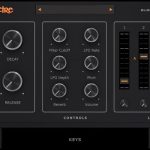

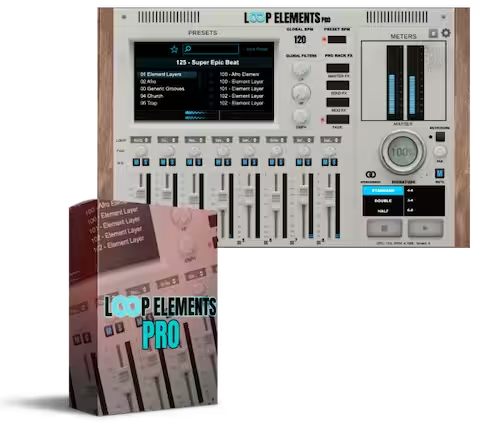
Loop Elements Pro VST/AU Plug-in
Loop Elements Pro VST is a standalone and plugin loop instrument for gospel, R&B, and live worship. 400+ presets, 8-channel mixer, Vari-8 FX, VST3/AU for Windows & Mac. Instant download.
Original price was: $199.99.$99.99Current price is: $99.99.
Description
Loop Elements Pro VST is a loop instrument that handles both the Sunday service and the late-night studio session. Gospel Producers built it from scratch — not as a sample pack, not as a Kontakt library, but as a dedicated plugin with its own engine. Buy it here as a paid instant download: click Buy Now, complete checkout, and the link hits your inbox right away.
✓ Version 1.5 — Now Available
v1.5 ships with 75+ new audio samples, 150+ new presets including the New Smack City pack, Setlist Mode for up to 12 songs, Smack Claps, full NanoKontrol support, and swing timing options. Already own it? The update is free.
What Is Loop Elements Pro VST?
Loop Elements Pro VST is a loop-based instrument built by Gospel Producers — the same team behind Loop Elements Vol. 1–3 and Loop Elements Deluxe. Where Deluxe was a Kontakt library, this is different: a standalone VST3/AU plugin with its own mixer, its own FX chain, and its own performance interface, so no host is required on stage and no Kontakt license is needed in the studio.
It loads inside Ableton, Logic Pro, FL Studio, Cubase, or any VST3/AU host on Mac and Windows. It also runs as a standalone app, which means you can open it directly, skip the DAW entirely, and play your full set from one screen.
What Musicians Say About the Loop Elements Pro Plugin
“Loop Elements Pro is worth waiting 10 years in the making. Easy and quick on the fly if you get that last-minute call — this is the way to go!”
— Verified buyer, Gospel Producers
“This was a major game changer and blessing to my live and studio sessions!”
— Verified buyer, Gospel Producers
Want to hear it before you buy? Watch Loop Elements Pro VST in action on the Gospel Producers YouTube channel — full demos, walkthroughs, and live performance clips.
Loop Elements Pro VST — Key Features (v1.5)
Loop Elements Pro VST Preset Library: 400+ Ready-to-Use Presets
Every loop from Vol. 1–3 and Deluxe carries over, and the v1.5 update stacked 150+ more presets on top — gospel, R&B, hip-hop, live worship — all tuned to sit in a mix without fighting the arrangement. The New Smack City pack alone covers a full range of modern feels. Pick a preset, drop it in, and you’re playing something that sounds finished.
8-Channel Loop Mixer Built Into Loop Elements Pro
Eight loops run simultaneously inside one plugin instance, so you can stack a kick pattern, a pad, percussion, and a bass line while blending them live on the built-in mixer without touching your DAW channel strips. You can also link faders across channels, which means balancing a multi-layer stack takes one drag instead of eight.
Per-Channel FX: Full Control on Every Loop
Every channel gets its own EQ, compression, reverb, delay, and modulation chain — independent of everything else in the mix. Dial a loop tight or wash it out, since the other seven channels stay untouched. v1.5 added a Loop Browser inside the Channel FX panel, so swapping a loop mid-session doesn’t mean closing your effects window to go hunting.
Pro-Rack Global FX Suite
On top of per-channel processing, there’s a global FX rack — tremolo, reverb, delay, modulation — that shapes the whole mix from a single point of control. When you need to push everything in one direction, such as adding more room or movement, the rack handles it without touching individual channels.
Vari-8 Live FX Module
One knob controls the Vari-8, and turning it shifts the loop — different texture, different pocket, same BPM. For live worship, this means verse two doesn’t sound like a copy of verse one, because the feel evolves without manually swapping sounds mid-song.
Loop Elements Pro Setlist Mode — Up to 12 Songs
Setlist Mode is the v1.5 feature that changed how worship musicians use this plugin on stage. Build a list of up to 12 songs, assign mute groups per scene, then step through the entire service without touching the mouse, since when a new section hits the right channel combination fires automatically. Gospel Producers built this after sustained requests from the live performance community, and it integrates cleanly with how church sets actually run.
75+ New Samples — Smack Claps Collection
Seventy-five new audio samples shipped in v1.5, led by the Smack Claps collection — Gospel Producers engineered these to cut through a live room at volume, with impact that holds up even without extra compression or layering. These aren’t polished-down library claps; they hit like real ones.
Standalone Loop Elements Pro VST App — No DAW Required
The standalone app runs on Mac and Windows with no DAW open, so you can load a setlist, plug into the house system, and play. v1.5 brought the standalone fully up to speed with the plugin version — swing support, NanoKontrol integration, custom preset import/export — meaning nothing is locked to one mode.
NanoKontrol Support & Key Commands
Plug in a Korg NanoKontrol and the mixer maps automatically — faders, knobs, transport — with no manual MIDI assignment required. Press K at any time to pull up the full keyboard shortcut list, or Shift+Click any fader or BPM value to type in an exact number rather than dragging.
Swing & Odd Time Signature Support
Swing runs from 20% up to 100%, so you get anything from a subtle push to a full shuffle. There’s also a 9/8 mode for when the song needs something less grid-locked, and both options sync correctly whether you’re running a DAW clock or the built-in tempo.
Who Uses the Loop Elements Pro VST Plugin?
Loop Elements Pro VST for Live Worship Musicians
Keyboard players and music directors running Sunday services are the core audience Gospel Producers had in mind, which is why standalone mode, Setlist Mode, and NanoKontrol support all point toward the same scenario: one musician, one laptop, a full set pre-loaded, no technical problems mid-service. The ability to step through an entire setlist hands-free — scene by scene, song by song — is something most loop instruments simply don’t offer.
Loop Elements Pro Plugin for Gospel & Studio Producers
In the studio, the plugin earns its place differently. Producers working in gospel, R&B, and soul load it as a session loop source inside Ableton or Logic, and because each channel already has its own FX chain, you’re dropping in a processed sound that fits the track — not a raw loop that needs three additional plugins to sit right.
Expanding Your Setup with the Mike B Expansion
Own the Mike B’s Signature Loops Expansion? It loads directly into Loop Elements Pro VST — Mikel Bereal’s personal MPC2000XL grooves sitting inside your existing setlists and preset library, ready to use.
Loop Elements Pro VST System Requirements
| Mac | Windows | |
|---|---|---|
| OS | macOS 10.12 or later (Apple Silicon native) | Windows 7 64-bit or later |
| CPU | 2.2 GHz Intel Dual Core or Apple Silicon | 2.2 GHz Intel/AMD Dual Core |
| RAM | 4 GB minimum | 4 GB minimum |
| Formats | VST3, AU, Standalone | VST3, Standalone |
| DAWs | Logic Pro, Ableton Live, FL Studio, Cubase, any AU/VST3 host | Ableton Live, FL Studio, Cubase, any VST3 host |
| AAX (Pro Tools) | Not yet supported — in active development by Gospel Producers | |
How to Download Loop Elements Pro VST
Hit Buy Now, complete checkout, and the download link lands in your inbox immediately — it also appears on the order confirmation page, so you have two places to grab it. No activation codes, no waiting. Download, install, play.
Browsing for more? Check the VST Instruments section or the Bundle Deals page for multi-purchase savings.
In-Depth Review
Loop Elements Pro VST Review — Honest Take After a Year of Use
8-channel mixer · Setlist Mode · 400+ presets · v1.5 breakdown · pros & cons
Read the Full Review →