

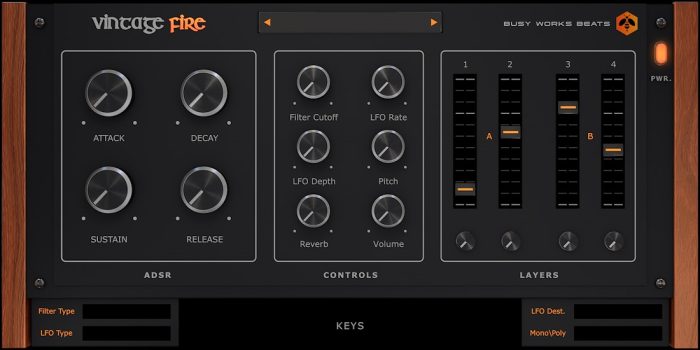


What makes the Vintage Fire VST plugin different is its focus on quality over quantity. Instead of throwing thousands of generic presets at you, it offers a selection of sounds that genuinely capture the vibe of classic analog equipment. Each one has been put together with an ear for the specific tone and texture that makes vintage gear so special.
What You Get with Vintage Fire VST:
- Authentic analog sound design
- Quick and easy sound selection
- Crafted by producer/designer Game
- Works with PC and Mac DAWs
- FL Studio, Ableton, and others
- 64-bit VST format
- Audio Unit (AU) for Mac
- No complicated interface
- Immediate usable sounds
- Vintage tonal character
- Modern compatibility
- Straightforward installation
Get Vintage Fire VST Now
Authentic analog sounds without the hardware cost. Instant download after purchase.
Why That Analog Vibe Still Matters
Modern music production can sometimes sound a bit too clean and perfect. That’s where analog character comes in – it adds warmth, subtle distortion, and harmonics that make tracks feel more alive and organic. The Vintage Fire VST plugin brings these qualities into your digital setup where you can use them alongside your other plugins.
The “quick and easy” approach means you don’t waste time hunting through menus. When you’ve got a musical idea, you can find a sound fast and get to work. This speed really helps when you’re in a creative flow or working on tight deadlines.
Whether you’re on a PC or Mac, the Vintage Fire VST plugin works with your system. The 64-bit support means it runs smoothly in today’s DAWs that need that architecture for better performance and handling of larger projects.
What You Need to Run It
The Vintage Fire VST plugin installs like any other virtual instrument. The download has everything for both Windows and macOS, with special attention to making sure the 64-bit version works properly.
System Requirements:
Windows: Vista, 7, 8, 8.1, 10 (64-bit versions recommended)
macOS: OS X 10.7 through 10.11, macOS Sierra, macOS Mojave, and newer versions
Once installed, you’ll find it in your DAW’s instrument list with your other plugins. The setup follows normal VST or Audio Unit procedures – no weird activation steps or online checks required.
If you like vintage-style sounds, you might also want to check out our other vintage VST plugins for more options with that classic analog feel.
Frequently Asked Questions
A: The plugin works with any DAW that supports 64-bit VST or Audio Unit instruments, including FL Studio, Ableton Live, Logic Pro, Cubase, Reaper, Studio One, and others.
A: The plugin specifically mentions 64-bit only. For best performance and compatibility with current systems, 64-bit operation is what you’ll need.
A: The plugin was custom made by Game, a producer and sound designer who focuses on creating usable, characterful instruments for today’s music makers.
A: They don’t give exact numbers, but the idea is quality over quantity. Each preset delivers real analog character instead of filling your hard drive with endless similar options.
A: You get instant access to the download link right after your payment goes through. The files are usually available within minutes, sent straight to your email.
Who Should Try Vintage Fire VST
Producers looking for that analog warmth in their digital productions will find the Vintage Fire VST plugin really helpful. The sounds work across different styles where organic character makes a difference – from hip-hop and R&B to electronic music and beyond.
Beat makers who work fast appreciate the quick sound selection. When you need a particular analog-style sound, you can grab it quickly without digging through complicated menus. This matters when you’re working against the clock or when you need to capture an idea before it disappears.
Musicians who don’t want to learn complex synthesis but still want pro-sounding results benefit from the preset approach. Most sounds are ready to go, often needing just small tweaks to sit perfectly in your mix.
Even experienced sound designers can use Vintage Fire VST as a starting point for further tweaking. The authentic analog vibe gives you a good base that takes well to additional effects and processing in your DAW.
Bring Analog Warmth to Your Productions
Vintage Fire VST delivers authentic analog character without the hardware. Add it to your plugin collection today.
For more detailed information about the product, visit the official Vintage Fire VST product page.
System Requirements Recap:
Mac OS X: 10.7 | 10.8 | 10.9 | 10.10 | 10.11 | macOS Sierra | macOS Mojave
Windows Version: Vista | 7 | 8 | 8.1 | 10 [32-bit | 64-bit]
Be the first to review “VINTAGE FIRE VST PLUG-IN”
You must be logged in to post a review.
Related products
Bundle Deals
VST Plug-ins
VST Plug-ins
VST Plug-ins
VST Plug-ins
Bundle Deals
Bundle Deals

VST Plug-ins
Reviews
There are no reviews yet.