

Plugins That Knock – KNOCK Plugin AU/VST3/AAX

Original price was: $119.00.$50.00Current price is: $50.00.
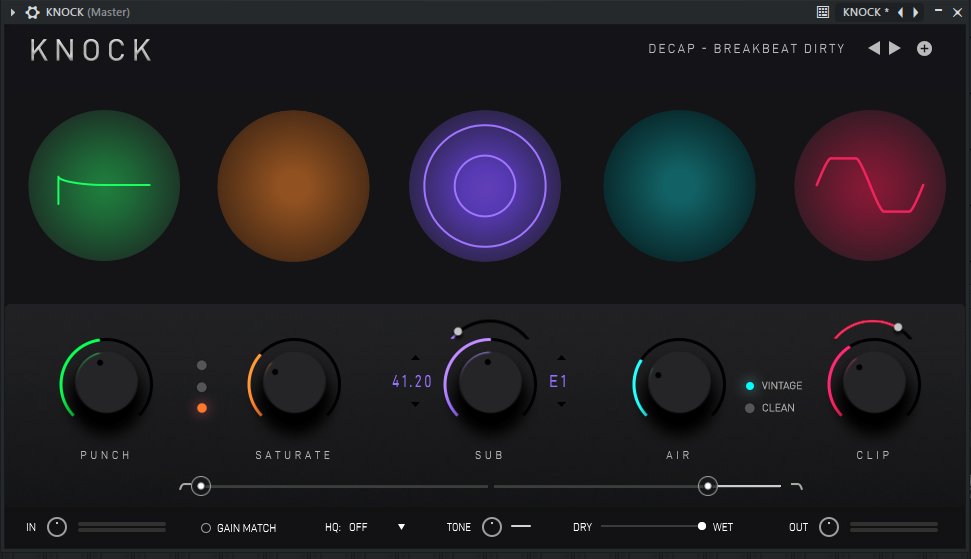
Plugins That Knock – KNOCK VST Drum shaper plugin with 5 modules: PUNCH, SATURATE, SUB, AIR, CLIP. Designed by platinum producer DECAP for punchy, professional drums. Includes factory presets. AU, VST3, AAX for macOS 11+ and Windows.
Plugins That Knock — KNOCK Plugin AU/VST3/AAX
Getting drums to cut through a mix can be a struggle. You might add compression, EQ, saturation, and transient shaping across multiple plugins, only to end up with a muddy or over‑processed sound. KNOCK, from Plugins That Knock, simplifies that process. Platinum producer DECAP designed this drum shaper, which combines five focused modules into a single insert, each addressing a specific element of drum tone.
The idea is straightforward: instead of chaining three or four different plugins, you load KNOCK and use the modules you need. Want more attack? Use PUNCH. Need harmonics? Turn up SATURATE. Missing sub‑bass? Engage SUB. The plugin is CPU‑light enough to run on multiple drum tracks at once, and because the processing tunes for drums, you get results faster.
KNOCK Plugin Drum Shaper
KNOCK’s five modules cover transient shaping, harmonic saturation, sub‑bass generation, high‑end air, and clipping. You can enable them independently, so you’re only using the processing your drums actually need. You’ll find a breakdown of each module below.
5 Processing Modules
- PUNCH — Transient Shaper
Sharpens the attack of drum hits. Add a controlled amount of punch to loops or individual samples without over‑compressing or squashing the natural dynamics. - SATURATE — Harmonic Distortion
Three selectable modes (Soft, Medium, Hard) add harmonic saturation while compensating for perceived loudness. Works on 808s, one‑shots, and full drum loops. - SUB — Sub Frequency Generator
Detects when a kick drum is present and generates a layered sub tone at your chosen pitch. Useful for reinforcing kick sub‑bass and tuning the kick to the key of the track. Particularly effective on breakbeats and sampled kicks that lack low‑end. - AIR — Top End Enhancement
Adds transparent high‑frequency presence in two modes (Vintage and Clean) without introducing harshness. Works well on snares, cymbals, and percussion to add definition without EQ artifacts. - CLIP — Hard & Soft Clipper
Adjustable clipper with selectable hard or soft curve. Push drums into the clipper for the warm, driven character of vintage analog gear running hot, without actual digital clipping.
Why KNOCK Works on Real Drums
DECAP designed KNOCK around the processing he uses on his own Drums That Knock series. That means every module tunes for the kind of drums you actually use in productions—sampled kicks, 808s, snares, hats, and loops.
Moreover, the SUB module is a standout. It listens for kick transients and generates a sine wave at the pitch you choose, reinforcing the low end without adding mud. This is especially helpful when you’re working with kicks that don’t have enough sub, or when you want to tune a kick to match your bassline.
Because the plugin is so efficient, you can place it on every drum channel without worrying about CPU spikes. You can also use it on a drum bus—the PUNCH and SATURATE modules work great on a full drum mix. The included factory presets from DECAP give you starting points for both individual channels and bus processing.
Ready to give your drums more punch and clarity?
Get the KNOCK Plugin and start shaping drums with five focused modules today.
System Requirements & Compatibility
Mac: macOS 11 or later, Intel or Apple Silicon (M1/M2/M3 native). AU, VST3, AAX. 8 GB RAM, 500 MB disk space.
Windows: Windows 8.1, 10, or 11 — 64‑bit. VST3, AAX. Intel Core i5+ or AMD Quad Core. 8 GB RAM, 500 MB disk space.
KNOCK works in all major DAWs that support VST3, AU, or AAX formats, including Ableton Live, Logic Pro, FL Studio, Cubase, Studio One, Pro Tools, and Reaper. The plugin does not require iLok or other dongle‑based copy protection.
For more drum‑processing tools, browse our selection of drum VST plugins. If you’re looking for the samples that made DECAP’s Drums That Knock series famous, check out the Drums That Knock bundle.
Frequently Asked Questions
What makes KNOCK different from a standard transient shaper?
Most transient shapers only control attack and sustain. KNOCK adds four additional layers on top of transient shaping — harmonic saturation with three selectable modes, a sub tone generator that locks to kick drum detection, transparent high-end air, and a hard/soft clipper. Each module is independently adjustable, so you can use just the ones that suit your drums.
Can the SUB module be used on 808s or only kick drums?
The SUB module is triggered by kick drum detection, which works most reliably on traditional kick drum sounds. For 808s and bass lines, the SATURATE and CLIP modules are more applicable for shaping tone and controlling peaks. The PUNCH module also works well on 808 transients.
Does KNOCK work natively on Apple Silicon Macs?
Yes. KNOCK is fully compatible with Apple Silicon M1, M2, and M3 Macs running macOS 11 or later. It runs as AU, VST3, and AAX without requiring Rosetta.
Is KNOCK good for drum buses or only individual channels?
Both. KNOCK VST Plugin was designed to be CPU-efficient so you can run it on multiple individual drum channels simultaneously. It also works well on a drum bus — the PUNCH and SATURATE modules in particular respond well to a full drum mix. Factory presets from DECAP cover both single-channel and bus applications.
Be the first to review “Plugins That Knock – KNOCK Plugin AU/VST3/AAX”
You must be logged in to post a review.
Related products

Bundle Deals
VST Plug-ins
VST Instruments
VST Plug-ins
VST Instruments
VST Plug-ins
VST Plug-ins
VST Plug-ins
Reviews
There are no reviews yet.