



Overview
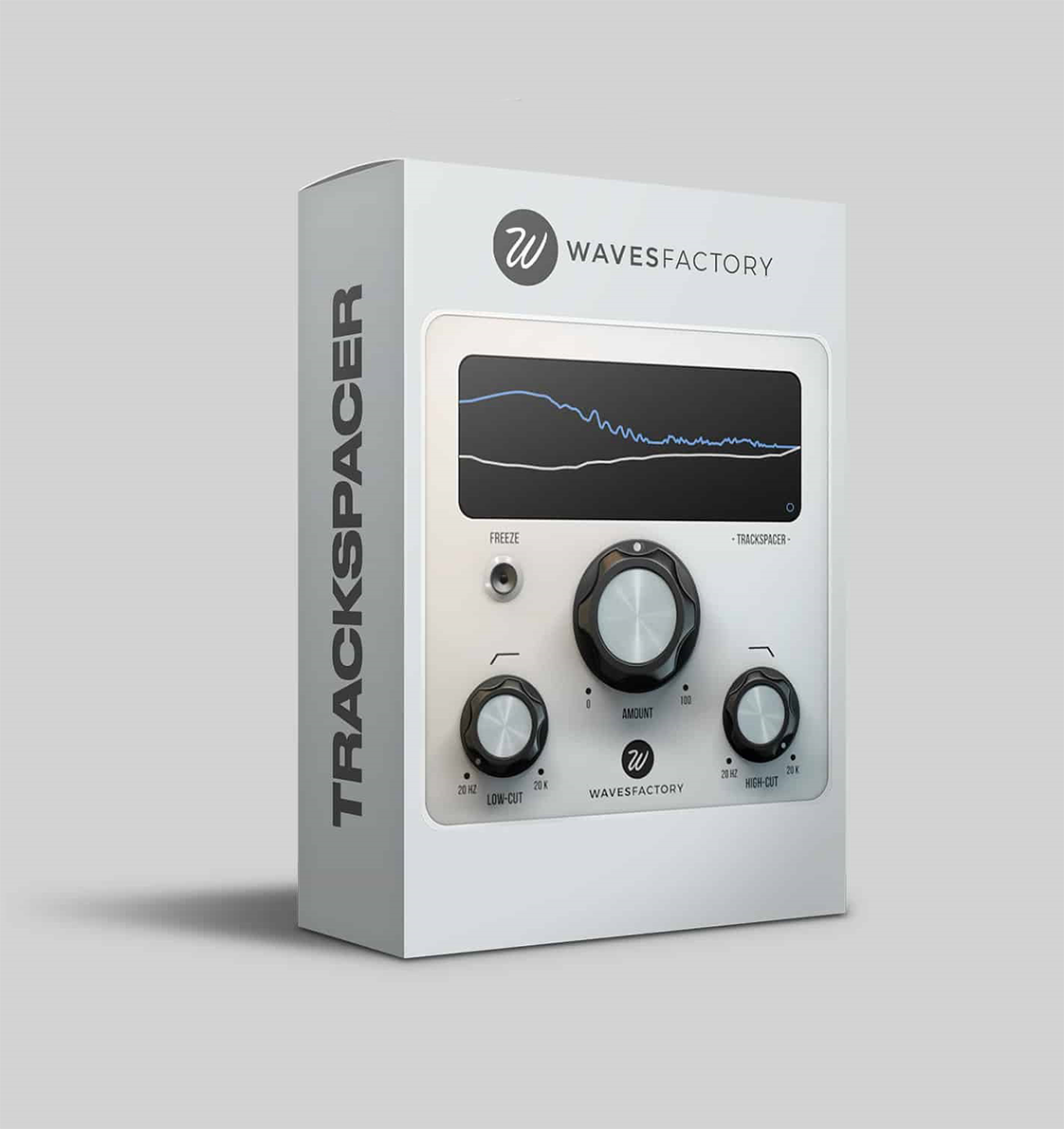
If you’ve ever struggled with two instruments fighting for the same frequency range—like a bassline muddying up the kick, or a vocal getting lost behind a synth—the Trackspacer 2 VST offers a straightforward solution. Instead of manually carving EQ notches or tweaking a multiband compressor, this plugin listens to a sidechain signal and automatically dips the frequencies that the main track needs. The result is a cleaner, more defined mix where each element has its own space to breathe. It’s like having an expert engineer sitting beside you, making subtle EQ adjustments in real time.
What Trackspacer 2 Does
- ✓ Automatic Frequency Carving – analyzes the sidechain input and applies an inverse EQ curve to the processed track
- ✓ 32‑Band Precision – works with 32 independent frequency bands for surgical accuracy
- ✓ Simple One‑Knob Control – turn the Amount knob up to carve more space, down to blend less
- ✓ High‑Pass & Low‑Pass Filters – restrict the processing to a specific frequency range for finer control
- ✓ Transparent Operation – doesn’t add coloration or artifacts when used moderately
- ✓ Works in Any DAW with Sidechain – compatible with FL Studio, Ableton Live, Logic Pro, Cubase, Studio One, etc.
Why You Might Need This Plugin
Mixing is largely about managing frequency clashes. Traditional sidechain compression ducks the entire track when the sidechain triggers, which can sound pumpy and obvious. A manual EQ cut can work, but it’s static—it doesn’t adapt to the changing content of the sidechain signal. Trackspacer 2 sits in the middle: it’s dynamic like a compressor, but frequency‑specific like an EQ. It only reduces the frequencies that are actually present in the sidechain, leaving the rest of the spectrum untouched.
This makes it ideal for situations where you want one element to stay clear without completely silencing another. For example, you can let the kick drum punch through the bass without losing the bass’s low‑end weight, or keep a vocal intelligible atop a busy instrumental without making the instrumental sound thin.
Common Mixing Problems Trackspacer Solves
- Kick & Bass Conflict – instead of sidechain compression that ducks the whole bass, Trackspacer carves out only the kick’s fundamental frequency, preserving the bass’s character.
- Vocals Getting Buried – sidechain the vocal to the instrumental bus; Trackspacer will dip the frequencies where the vocal sits, making it stand out naturally.
- Guitar & Keyboard Overlap – when a rhythm guitar and a pad occupy the same mid‑range, Trackspacer can create a “pocket” for one without heavy EQ cuts.
- Drum Bus Clarity – route the snare to Trackspacer on the overheads or room mics to reduce snare buildup in those channels.
How to Use Trackspacer 2 in Your DAW
Using the plugin is straightforward:
- Insert Trackspacer on the track you want to process (e.g., the bass).
- Set the sidechain input to the track you want to make room for (e.g., the kick).
- Adjust the Amount knob until you hear the desired clearing effect. Start with 20‑30% and increase if needed.
- Optionally, use the High‑Pass and Low‑Pass filters to limit the frequency range being processed.
That’s it. You don’t need to understand the 32‑band engine or the advanced panel to get great results—the one‑knob approach works for most situations. If you want to dig deeper, the advanced panel gives you control over attack/release, stereo linking, and more.
Technical Details
- Version: Trackspacer 2.5.10 (latest as of this update)
- Processing: 32‑band dynamic EQ with sidechain analysis
- Controls: Amount knob, High‑Pass filter, Low‑Pass filter, advanced parameters (attack, release, stereo link, etc.)
- Plugin Formats: VST, VST3, AU, AAX (64‑bit)
- System Requirements:
- macOS: 10.9 or higher, Intel & Apple Silicon (M1/M2) compatible
- Windows: 7, 8, 10 (64‑bit)
- DAW Compatibility: Any DAW that supports sidechain routing (FL Studio, Ableton Live, Logic Pro, Cubase, Reaper, Studio One, etc.)
- License: Official Wavesfactory license; you’ll receive a license file after purchase
- Delivery: Download link and license file emailed within 1‑12 hours of payment
Important: This is a legitimate license for Trackspacer 2. After purchase, you’ll receive a license file that you can use to activate the plugin via the Wavesfactory installer. You can download the installer directly from the official Wavesfactory website.
Add Trackspacer 2 VST to Your Cart
Get the latest version of Wavesfactory’s award‑winning sidechain EQ plugin. Click below to purchase your license.
License file and download instructions arrive via email after payment.
Frequently Asked Questions
Who Should Consider Trackspacer 2?
- Mixing Engineers – who want a fast, transparent way to resolve frequency clashes without manual EQ automation.
- Producers Making Electronic Music – where kick‑bass separation is critical and traditional sidechain compression can sound over‑done.
- Home Studio Owners – who need a “set‑and‑forget” tool that makes mixes clearer without advanced engineering knowledge.
- Podcast & Voice‑Over Editors – looking to keep dialogue clear when background music or ambience is present.
- Anyone Tired of Static EQ Cuts – because Trackspacer adapts to the audio, it often sounds more natural than a fixed EQ notch.
The Trackspacer 2 VST is one of those plugins that becomes a permanent part of your mixing toolkit once you try it. If you’ve ever spent ages tweaking EQ curves to make two elements coexist, only to find they still fight, this plugin can save you that time and frustration. Watch the tutorial videos on the Wavesfactory site, and if you like what you hear, grab your license here.
Short Description: Trackspacer 2 VST plugin creates space in mixes by carving frequencies based on sidechain input. 32‑band precision, simple one‑knob control. For PC & Mac.
Be the first to review “Wavesfactory Trackspacer 2 VST For PC & MAC”
You must be logged in to post a review.
Related products


Sound Loops & Samples
StudioLinked – Modernize VST + Festival Trap, EDM Trap EXPANSIONS
VST Plug-ins

VST Plug-ins
VST Instruments

VST Instruments
VST Instruments
Reviews
There are no reviews yet.