

Sugar Bytes Looperator VST Plugin for Loop Design & Effects


Original price was: $119.00.$35.00Current price is: $35.00.
Sugar Bytes Looperator VST plugin transforms boring loops into dynamic patterns with slicing, effects sequencing, and intelligent randomization for creative loop design on PC & Mac.
Sugar Bytes Looperator VST: Transform Loops from Basic to Brilliant
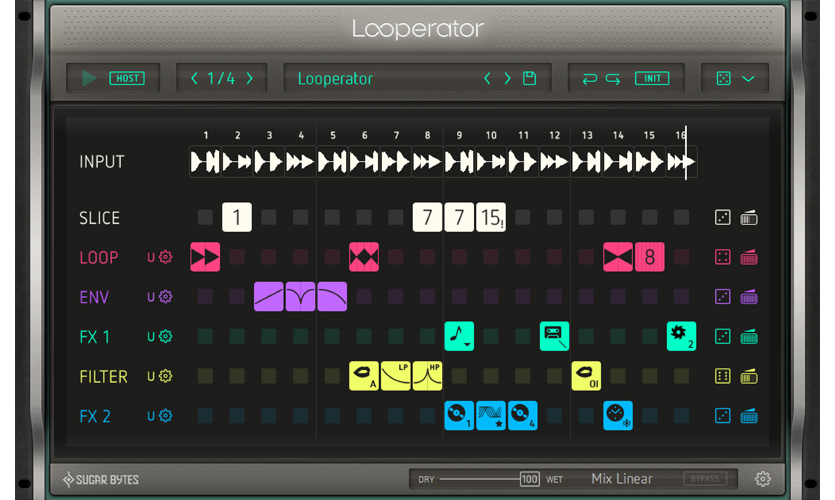
If you’ve ever listened to a drum loop or melodic phrase and thought, “This needs more movement, more creativity, more life,” then Looperator is exactly what you’ve been looking for. This isn’t just another effect plugin – it’s a complete loop manipulation toolkit that lets you slice, rearrange, and transform audio in ways that would take hours to program manually in your DAW.
What makes Looperator special is how it combines two powerful concepts: sample slicing and precision effects sequencing. You can chop up loops into pieces and rearrange them rhythmically, while simultaneously applying effects with surgical timing. The result is that you can take a simple, repetitive loop and turn it into something dynamic, evolving, and full of creative energy.
🎛️ Looperator’s Core Capabilities
- 16-Step Sample Slicer – Chop loops into rhythmic segments
- Intelligent Random Algorithms – Generate usable patterns instantly
- Precision Effects Sequencing – Time effects to specific steps
- Looper with Reverse Mode – Create backward effects and textures
- Time Stretch & Talkbox Filter – Manipulate timing and tone
- Independent Left/Right Control – Process stereo channels separately
- Unlimited Undo/Redo – Experiment without fear
- 5 Parameters Per Effect & Step – Detailed control over processing
- Full MIDI Integration – Trigger patterns from your controller
- Low CPU Usage – Run multiple instances smoothly
How Looperator Works in Your Productions
Imagine you have a basic four-bar drum loop. Load it into Looperator and you can instantly create variations: stutter effects on the snare, filtered breakdowns, reversed cymbals, and rhythmic glitches that happen in perfect time with your track. The 16-step slicer lets you rearrange the pieces of your loop, while the effect sequencer lets you apply processing like filtering, distortion, delay, and reverb to specific slices.
The preset tools are where Looperator really shines. Creating complex rolls, stutter edits, and glitch effects manually in a DAW can be tedious and time-consuming. With Looperator, you can achieve these professional effects with just a few clicks. The smart random algorithms help when you’re stuck – they generate patterns that actually sound good, giving you starting points that you can then refine.
Why Producers Love Looperator
For electronic music producers, Looperator provides that modern, glitchy texture that’s so popular in genres like future bass, trap, and experimental electronic. Instead of spending hours manually editing audio to create variation, you can achieve similar results in minutes while maintaining perfect timing and sync.
Live performers appreciate how Looperator can be triggered via MIDI notes. You can assign complete effect sequences to different keys on your controller, then trigger them during performances. This turns Looperator from a studio tool into a live instrument, perfect for DJs and electronic performers who want to add dynamic processing to their sets.
Sound designers use Looperator to create unique textures and rhythms from existing audio. By combining slicing with effects sequencing, you can transform simple source material into complex, evolving soundscapes that would be difficult to create with traditional editing techniques.
Technical Details & System Requirements
Plugin Formats: VST, VST3, AAX, AU (64-bit)
DAW Compatibility: Works in all major hosts including FL Studio, Ableton Live, Logic Pro, Cubase, Pro Tools, Studio One, Reaper, Reason, and Bitwig
Windows Requirements: Windows 7/8/8.1/10 (32-bit & 64-bit) • 4GB RAM minimum
macOS Requirements: OS X 10.7 through macOS Catalina • 4GB RAM minimum
CPU Usage: Efficient design allows multiple instances without straining your system
Sync Options: Syncs to DAW transport or external MIDI clock
Preset Management: Save and recall your own custom patterns and settings
🎛️ More from Sugar Bytes
Sugar Bytes is known for its creative, performance-oriented plugins. Complete your collection with these other Sugar Bytes titles:
❓ Frequently Asked Questions About Looperator
What types of audio work best with Looperator?
Looperator excels with rhythmic material: drum loops, percussion patterns, basslines, and rhythmic melodic phrases. However, it can also create interesting textures with pads, vocals, and sound effects. The key is that the source material has some rhythmic element that the slicer can work with.
Can I use Looperator in a live performance setting?
Absolutely. Looperator’s MIDI triggering capabilities make it ideal for live use. You can assign different patterns to different MIDI notes and trigger them from a controller. The plugin also syncs to external clock sources, perfect for DJ setups or live electronic performances.
How steep is the learning curve?
Looperator is surprisingly intuitive for what it does. The interface is visual and logical – you can see the 16 steps, the slices, and the effect assignments. Most users can create interesting results within minutes of loading the plugin. The included presets also provide great starting points that you can modify.
Does Looperator work with time-stretching algorithms?
Yes, Looperator includes time-stretching capabilities that let you manipulate the timing of slices without affecting pitch. This allows for creative rhythmic manipulation that stays in sync with your project tempo.
Can I process stereo tracks with independent left/right effects?
Yes, one of Looperator’s unique features is independent control over left and right channels. You can apply different slicing patterns or effects to each channel, creating wide stereo effects and interesting spatial movement.
Getting Creative with Looperator
Start with a simple loop that you know well. Load it into Looperator and try the random pattern generator – you’ll be surprised how often it creates usable, interesting variations. From there, you can tweak individual steps, adjust effect parameters, and create your own custom patterns.
Experiment with the slicer settings. Try different slice divisions – 16th notes, triplets, or irregular patterns. Combine slicing with effects like the talkbox filter or reverse looper to create textures that go beyond simple rearrangement.
Save your favorite patterns as presets. Over time, you’ll build a library of go-to effects and transformations that fit your production style. These presets can dramatically speed up your workflow when you need to add movement and interest to static loops.
🎚️ Ready to Transform Your Loops?
Join producers using Looperator for creative loop manipulation
Add Sugar Bytes Looperator to Cart
Instant download • Low CPU usage • Perfect for studio and live use
For more creative effects and processing tools, check out our Effects VST category where you’ll find additional plugins for sound manipulation. If you’re interested in other Sugar Bytes products, explore our Sugar Bytes collection for their complete range of innovative plugins.
The official Sugar Bytes product page provides additional information and audio demos at sugar-bytes.de/looperator. This resource shows the plugin in action and demonstrates its creative potential.
Sugar Bytes Looperator represents a unique approach to loop manipulation. By combining slicing, effects sequencing, and intelligent randomization, it provides tools that inspire creativity and solve the common problem of repetitive, static loops. Whether you’re producing electronic music, scoring for media, or performing live, Looperator can add that professional polish and creative spark that separates amateur productions from professional ones.
Be the first to review “Sugar Bytes Looperator VST Plugin for Loop Design & Effects”
You must be logged in to post a review.
Related products


VST Instruments
VST Plug-ins


VST Instruments

VST Instruments
VST Plug-ins
VST Plug-ins

VST Instruments
Reviews
There are no reviews yet.