

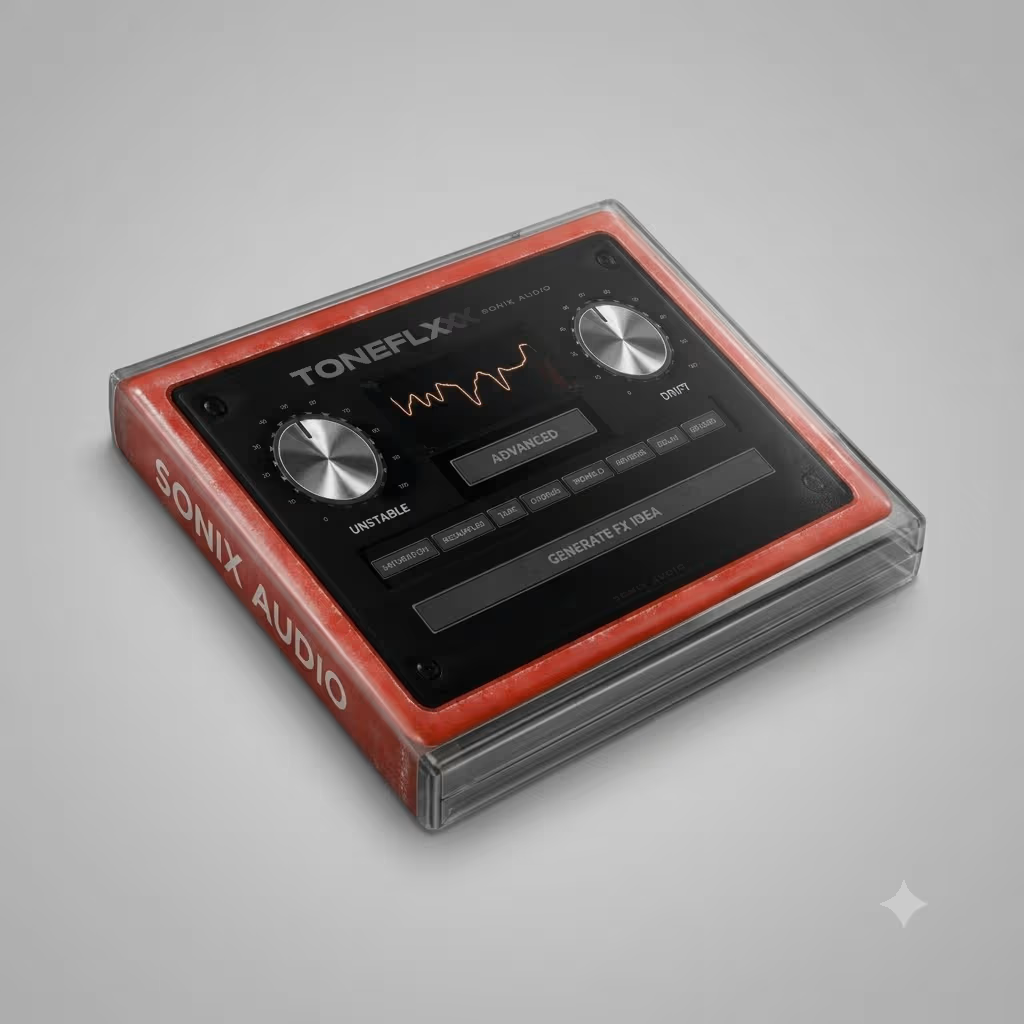

The Toneflx VST Plugin from Sonix Audio exists for one studio problem: digital melodies that sit correctly on the grid yet still sound thin. You have tried stacking saturators, chorus, delay, and reverb. However, five inserts later the CPU is high and the loop still lacks hardware character. Toneflx puts eight analog-style pedals on one board so you can warm, texture, and move a sound without rebuilding that rack every session.
Inside Toneflx you get saturation, tape, chorus, tremolo, reverse, delay, reverb, and a resampler. Drag pedals like a floorboard, hit Generate when you need a fresh chain, then save what works. As a result, trap melodies, R&B pads, and lo-fi loops leave the insert with more body and less plastic sheen.
What the Toneflx VST Plugin Does in a Real Session
Sonix Audio designed Toneflx as a pedalboard, not a single-effect plugin. You stack and reorder eight processors in any order. For example, light tape on a Rhodes keeps the tone soft. Heavy saturation into reverse into delay can dissolve a lead into texture. Drift and Unstable add small pitch and timing shifts, so loops stop sounding frozen.
Generate is the workflow shortcut most producers keep using. Pick a vibe, load a chain, tweak Drive or Drift, and commit. Presets come from working producers rather than a randomizer dumping noise on your bus. If you already browse our VST plug-ins for creative processing, Toneflx is the color stage you park early in the chain.
Eight Pedals on One Board
Saturation and tape thicken harmonics. Chorus and tremolo add width and pulse. Reverse, delay, and reverb open space. Meanwhile, the resampler brings grit when you want dirt without a separate bit-crusher. Because every pedal lives on one insert, A/B’ing FX on melodies, vocals, or a drum bus stays fast.
600+ Presets From Working Producers
Toneflx ships with 600+ presets from producers with credits on records by Drake, Future, Lil Baby, Travis Scott, Bryson Tiller, and others. Load a chain, nudge a few knobs, move on. After the color stage, tools like Cableguys ShaperBox 3 can add drawable rhythmic modulation on top.
Who Uses the Toneflx VST Plugin Day to Day
Trap and hip-hop producers run it to pull plastic sheen off melodies and loops. R&B and pop writers lean on tape, chorus, and reverb for soft width. In addition, lo-fi and electronic sessions push Unstable and Drift for timing that feels recorded instead of programmed. Mixers drop Toneflx on sends or buses when a track needs character without six extra inserts.
Sound Design Without Leaving the Session
Long FX chains used to mean bouncing stems or watching the meter climb. With Toneflx you stay on one insert, reorder pedals, and Generate when the idea stalls. Sketch fast, then refine later. For the technical side of analog-style warmth and space, Sound On Sound’s technique library is a useful read. Ableton users can also follow the official plug-in guide for format and scan tips during install.
DAW and System Support for Toneflx
Formats are VST3 and AU (64-bit) on Windows 10/11 and macOS 10.13+, including Apple Silicon. Tested hosts include Ableton Live, Logic Pro, FL Studio, Reason, Reaper, and Cubase. Internet is needed during install for activation. Therefore, leave some headroom on dense projects — the same rule you apply to any multi-FX board. Looking for instruments that sit well next to it? Try Kepler Audio Mirage VST beside your Toneflx chains.
✅ What’s Included
- ✓ Toneflx VST Plugin (Sonix Audio) — Mac & Windows
- ✓ 8 analog-style effect pedals in one board
- ✓ Saturation, resampler, tape, chorus, tremolo, reverse, delay, reverb
- ✓ Generate engine for FX chain ideas
- ✓ Drift & Unstable modes for analog-style movement
- ✓ 600+ presets from industry producers
- ✓ Drag-and-drop pedalboard routing inside your DAW
- ✓ VST3 / AU 64-bit formats
- ✓ Separate Windows and macOS downloadable installers
- ✓ ARTIST SERIES V.001 MULTI KIT — TONEFLX EXPANSION
- ✓ ARTIST SERIES V.002 MULTI KIT — TONEFLX EXPANSION
Artist Series V.001 and V.002 Multi Kits (Included)
This Toneflx download now includes both Sonix Audio Artist Series Multi Kits with the plugin. V.001 is the larger preset, mixer, loop, and tutorial pack. V.002 is the session pack: pre-mixed melody project templates, extra loops, and another Analog Lab bank. Install Toneflx first so the new banks appear in the plugin and in FL Studio, Logic Pro, or Ableton Live. Official references: ARTIST SERIES V.001 MULTI KIT — TONEFLX EXPANSION and ARTIST SERIES V.002 MULTI KIT — TONEFLX EXPANSION.
ARTIST SERIES V.001 MULTI KIT – TONEFLX EXPANSION
V.001 is the first Artist Series kit built for Toneflx. Use it when you want more pedalboard starting points, Analog Lab patches that already sit next to the board, and mixer chains you can drop on an instrument track. Three sound-design tutorials show how those chains were built so you can copy the method on your own samples.
V.001 patterns
- Dry loop, then color. Load a V.001 Toneflx preset on a clean melody. Raise Drive until the loop sits with the drums, then add Drift only if it still feels frozen.
- Instrument plus mixer. Start with an Analog Lab patch, then drop a V.001 instrument + Toneflx mixer preset in FL Studio, Logic Pro, or Ableton Live so the synth and the pedalboard share one color.
- Tutorial rebuild. Watch one of the three included tutorials, rebuild the chain on a different sample, and save it as your own board.
✅ ARTIST SERIES V.001 MULTI KIT — What’s Included
- ✓ 200+ Toneflx presets
- ✓ 40+ Analog Lab presets
- ✓ 35+ instrument + Toneflx mixer presets (FL Studio, Logic Pro, Ableton Live)
- ✓ 20+ Toneflx mixer chain presets (FL Studio, Logic Pro, Ableton Live)
- ✓ 30+ loops
- ✓ 3 exclusive sound design tutorials
ARTIST SERIES V.002 MULTI KIT – TONEFLX EXPANSION
V.002 is the second Artist Series kit. It ships fewer Toneflx presets than V.001 and more session-ready material: pre-mixed melody project templates, extra loops, and another Analog Lab bank. Open it when you would rather start from a mixed idea than an empty clip. Sample-flip chains are the usual reason this volume gets used after V.001.
V.002 patterns
- Open a mixed template. Load a V.002 melody project in FL Studio, Logic Pro, or Ableton Live, then swap the MIDI or the sample while keeping the Toneflx insert.
- Flip the loop first. Drop a V.002 loop on the timeline, run it through a V.002 Toneflx preset, then write a new top line on that texture.
- Mixer chain on a bus. Put a V.002 Toneflx mixer chain on a melody bus so several tracks pick up the same analog-style movement.
✅ ARTIST SERIES V.002 MULTI KIT — What’s Included
- ✓ 100+ Toneflx presets
- ✓ 40+ Analog Lab presets
- ✓ 11+ pre-mixed melody project templates (FL Studio, Logic Pro, Ableton Live)
- ✓ 30+ instrument + Toneflx mixer presets (FL Studio, Logic Pro, Ableton Live)
- ✓ 20+ Toneflx mixer chain presets (FL Studio, Logic Pro, Ableton Live)
- ✓ 35+ loops
Why Producers Still Reach for Analog-Style FX
Stock plugins are clean. Clean is fine when you need transparent mixing and mastering. Character is a different job. Saturation, tape motion, and small timing imperfections help melodies lock to drums and keep loops from sounding sterile. The Toneflx VST Plugin handles that color stage up front — then you EQ and compress as usual.
Presets are human-made. Chains save. Pedals move. Beginners get usable results quickly. Experienced producers get a dedicated FX board without rebuilding a six-plugin stack every time. In short, Toneflx keeps creative FX close to the source instead of scattered across the mixer.
Need Help?
Frequently Asked Questions
|
🎧 Compatibility DAWs, OS & formats |
🎛️ Features Pedals, presets & Generate |
🛠️ Workflow Chains, CPU & setup |
Still have a question?
Ask about setup, DAW compatibility, or how Toneflx fits your session. We help with that.
Get the Toneflx VST Plugin in Your DAW
If melodies still sound too digital and your FX rack keeps growing, the Toneflx VST Plugin gives you eight pedals, Generate, Drift, Unstable, 600+ producer presets, plus Artist Series V.001 and V.002 Multi Kits, on one download. Warm the tone, shape the texture, then get back to the beat.
Add Toneflx to your cart and put the board on your next loop instead of rebuilding the same chain again.
Be the first to review “Toneflx VST Plugin – Analog FX Pedalboard by Sonix Audio”
You must be logged in to post a review.
Related products
VST Instruments
VST Plug-ins
VST Instruments
Sound Loops & Samples
StudioLinked – Modernize VST + Festival Trap, EDM Trap EXPANSIONS
VST Plug-ins
VST Plug-ins
VST Plug-ins
Reviews
There are no reviews yet.